Category Archives: Statistics

Fulfilling Service Hour Requirements through Zooniverse

We are incredibly grateful to the many individuals who volunteer through Zooniverse to fulfill service hour requirements for graduation, scholarships, and more. This is a fantastic way to meet your requirements while contributing to significant research and discoveries, helping teams worldwide better understand ourselves and the universe. 

Below are instructions for participants (students), followed by instructions for Organization Leads supporting students in these efforts. 

Instructions for Participants

Step 1: Share this opportunity with your Organization

Contact your organization to see if participating in Zooniverse can fulfill your volunteering or other participation requirements. A good approach is to share this blog post with your organization so they understand what you will do and how you will document your participation. We strongly recommend checking with your organization before you start to ensure your efforts are recognized.

Step 2: Register at Zooniverse.org

Create a Zooniverse account by clicking ‘Register’ in the upper-right corner of the Zooniverse.org homepage. Only your name and email are captured, and we do not share email addresses outside of Zooniverse. 

Note: Registration is not required to participate in Zooniverse, but it is useful in this case to create a volunteer certificate documenting the number of hours you spent classifying and the number of classifications you did. Volunteer certificates are often required documentation for service learning hours.

Step 3: Participate!

Dive into any project and start classifying! There are typically over 80 active projects listed at zooniverse.org/projects. You can filter by different disciplines (history, space, nature, climate, etc.) to find projects that align with your interests. Every project’s ‘classify’ page has a brief tutorial to guide you on what to do and how to do it. 

Be sure to be logged in while you participate so that your stats and hours of participation are recorded and can be included in your certificate.

Step 4: Generate your Volunteer Certificate

Go to zooniverse.org, sign in, and click ‘More Stats’. Use the drop-down options on the upper-right of the stats bar cart to filter to a specific time period and/or project of interest. Then click on ‘Generate Volunteer Certificate’ (the button to the bottom-right of your stats bar chart).   

Share your Certificate with your Organization. We’d love it if you continue participating!

By following these steps, you can fulfill your service hour requirements while making meaningful contributions to scientific research. Happy classifying!

For details on how hours are calculated, please see notes at the bottom of this post.

Instructions for Organization Leads:

Step 1: Get to know the Zooniverse

When sharing this opportunity with your volunteer community, we recommend emphasizing the benefits volunteers gain beyond just contributing time and classifications. Instead of creating busy work, encourage participants to reflect on how their efforts (and the community’s collective efforts) contribute to our understanding of the world and the broader universe. 

Watch this brief introduction and video for more context about the Zooniverse, the world’s largest platform for people-powered research, with dozens of active projects and millions of participants worldwide. 

Each Zooniverse project is led by a different research team, covering a wide range of subjects:

The collective efforts of Zooniverse projects have resulted in hundreds of research publications to date.

Step 2: Share Zooniverse with your Network

Share the instructions above for the simple steps on how to participate and generate a certificate.

If you need to reference a 501(c)(3): Chicago’s Adler Planetarium, one of the hosts of the Zooniverse Team, is a 501(c)(3). Organizations that need to link explicitly to a 501(c)(3) for their volunteering efforts use the Adler Planetarium as the reference. Documentation of the Adler Planetarium’s 501(c)(3) status is provided here. Note: Zooniverse is a program within Adler, Oxford, and the University of Minnesota; it is not a 501(c)3 of its own. 

Step 3: Create a Group

If you’re interested in tracking your participants’ engagement, setting group goals, and more easily telling your story of collective impact, check out this blog post for details and instructions.

Step 4: Share your Stories of Impact with Us

We’d love to hear about your experience and share your stories of impact with the broader Zooniverse community to spark ideas and inspiration in others. See this Daily Zooniverse post as an example. Email us at contact@zooniverse.org with your stories, and don’t hesitate to email us if you have any questions or need additional information. 

By following these steps, you can include Zooniverse in your volunteer opportunities and help your participants fulfill their service hour requirements while making meaningful contributions to scientific research. Thank you for including Zooniverse in your offerings!

How we calculate ‘Hours’ within Zooniverse Stats:

The hours displayed in the personal stats page are calculated based on the start and end times of your classification efforts. Hours posted there do not reflect time spent on Talk. Talk-based effort is deeply valued and important for Zooniverse projects – it’s where community is built and where many critical discoveries across the disciplines have been made. But within the scope of this phase of developing the new stats and group pages, we only built out views for hours spent classifying.

A little more detail on how the classification time is calculated. Over the years, Zooniverse has updated its infrastructure for robustness and sustainability. In 2015, we built and launched onto our current infrastructure, ‘Panoptes’, and its associated database. At that time in 2015, we started recording both the start and end times for each classification. This means that for all classifications 2015 and beyond, the calculation for time spent on each classification is a straightforward subtraction: finished_at – started_at. We then add up all these values to get the number of hours you’ve spent classifying.

When we made the choice to use the simple ‘finished_at – started_at’ we knew that that could lead to an overestimate of time spent classifying (i.e., you might step away from your computer after starting a classification and then come back to it later). We wanted to keep things as simple as possible and we didn’t want to make assumptions about what someone is doing during the time between ‘finished_at’ and ‘started_at’. We also preferred to err on the side of overestimating rather than underestimating – we’re just so grateful for people’s participation and want to celebrate that.

We do set a 3-hour cap on a single classification to mitigate the impact of ‘stepping away’ on the calculation of your stats. Volunteer tasks on Zooniverse vary widely in complexity—some are quick, like answering yes/no questions, while others, like detailed transcriptions, take more time. Analyzing classification durations across projects, we found that most average between 0–30 minutes, some exceed 30 minutes, with the longest averaging over 3 hours. We ran simulations testing different caps, from 15 minutes to 20 hours, discussed the findings, and decided on a 3-hour cap to fairly credit longer tasks while reducing the impact of idle time.

If you are required to list contact information:

If your program requires that you list contact information for the Zooniverse, please use the following:

Dr. Laura Trouille, Zooniverse Principal Investigator, Adler Planetarium, 1300 South DuSable Lake Shore Dr., Chicago, IL 60605, contact@zooniverse.org

Again, please keep in mind that we unfortunately do not have the capacity to fill out and/or sign individual forms. If your organization is not able to use the automatically generated signed Volunteer Certificate (see notes above), best to find an alternate volunteer opportunity.

Launch News: Community-Building Pages

At the Zooniverse, we strive to foster a vibrant community of software engineers, researchers, and everyday participants. Each week the Zooniverse volunteer community contributes over 1 million classifications across ~80 active projects. This collective effort has contributed to hundreds of publications. Many of you have experienced first-hand or heard about serendipitous discoveries through Talk or by reading a project’s results page. Your contributions make a real difference in advancing scientific research and discovery worldwide. 

To further encourage and support this sense of collective effort leading to discovery, we’re exploring additional pathways for people to connect. With newly implemented Group Engagement features, like-minded participants can connect, collaborate on projects, and work together toward shared goals.

We can’t wait to see the creative ways our community will make the most of this new Groups feature!

Introducing the new Zooniverse Groups community-building pages.

WHAT IS IT?

With the new Groups feature, you will be able to track collaborative achievements with friends and family, fellow science enthusiasts, educational groups, and more within the Zooniverse community. Track your stats and see which projects trend within your group.
HOW DOES IT WORK?

Creating a Group

Once you’re logged in to Zooniverse, you can select ‘Create New Group’ from the ‘My Groups’ panel in the zooniverse.org homepage. By creating a new group you are the admin of the group. 

Creating a new Zooniverse Group.

First, name your group. You can use any combination of characters including special characters and emojis. Next, select your group permissions. The private selection will only allow group members to access and view your group’s stats page. The public selection will make the group stats page viewable by anyone. Then, choose your members’ individual stats visibility. You can choose whether to never show each contributor’s stats, always show them, or only show them to members of the group. A group admin will always see these individual stats. Finally, click “Create New Group”. You will be brought to your new group stats page where you can then copy the join link and invite members. More on joining a Group below.

Using the Bar Chart

From the homepage click on any of your groups to view that group’s stats page. The bar chart will default to showing your stats for all contributors for all projects from the last 7 days.

Using the Zooniverse Groups bar chart.

To change the time range or projects use the dropdown menus above the chart. Note that if you change the dates, it will also change which projects are selectable based on your activity in that time period. The Hours tab shows a summary of the time spent across your group classifying subjects. 

Top Projects

These are your most classified projects for the selected time period. If you change the time frame, you can expect your top projects to update as well.

Top Contributors

Next is a list of top contributors (group members with the most classifications during the specified time period). You can see a more detailed view if you click ‘See all contributors and detailed stats’. This will bring you to a full list of contributors and their stats across all time. Clicking ‘Export all stats’ generates a .csv file. A future feature will be the ability to filter to specific time periods within this detailed stats page. 

Showing all Zooniverse Groups participants' stats.

Managing a Group

From the homepage click on any of your groups to view your group’s stats page. If you’re the admin for a group, you’ll have a ‘Manage Group’ option at the top of the group’s stats page. When you click on ‘Manage Group’, you will see the same settings as when you first created the group. You can change these admin settings at any time. You will also be able to manage the members of your group. Navigate to a member’s row and click on the 3-dot options menu. Here you can give admin access, remove admin access (if previously given), or remove a member. Note: as long as someone has a ‘Join Link’, they can always rejoin the group at any time. Press “Save changes” to return to your group. 

Managing your Zooniverse Group.

If you click ‘Deactivate Group’, this removes the group and its stats’ visibility (making the group unsearchable and unjoinable). Note: this does not delete the group from our internal Zooniverse database. 

Joining a Group

In order to join a group, the group admin or a group member will share the ‘Join Link’ for that group with you. The ‘Join Link’ is at the top of the group’s stats page. 

Using the Zooniverse Groups join link.

Once you have the link, simply click it to be added to the group. Note: you must be logged-in in order to join a group. Once you’ve joined, you’ll immediately be able to view your group’s stats page. 

At any time, you can view all of your groups by clicking ‘See all’ within the ‘My Groups’ panel in your zooniverse.org homepage. 

You may notice a few existing groups with alphanumeric names (e.g., 597C5881-3808-4DF7-B91A-D29E58E19FFC) in your groups list. These groups were created via our classroom.zooniverse.org portal for curricula such as Wildcam Labs or Galaxy Zoo 101. If you’re the group admin (indicated by the ‘admin’ label), you can click ‘Manage Group’ to give your group a more descriptive name. If you’re a group member, you can either click ‘Leave Group’ (if the class experience is complete) or ask your instructor (the admin) to rename the group. In future updates, we’ll enable naming groups directly within the classroom.zooniverse experiences.

Leaving a Group

From the homepage click on any of your groups. At the top of the group’s stats page, click ‘Leave group’. Note: you can rejoin a group at any time as long as you still have access to the unique Join Link.

Sharing a Group

If the admin of your group has set your group visibility settings to ‘public’, you’ll have the ‘Share Group’ option at the top of your group’s stats page. Clicking ‘Share group’ will copy a link to the public-facing view of your group’s stats page. This is different from a ‘Join Link’. Anyone with the ‘Share Group’ link will simply be able to view the group’s stats, but will not be added as a member of the group. 

UPD: Example of a Group

In November 2024 we interviewed members of PSR J0737-3039 – a Zooniverse group focused on space projects – to learn why and how Zooniverse contributors use this feature. Read the full interview.

JOIN THE CONVERSATION

We value your feedback! We’re keen to hear about your experiences with the new Groups feature. Please share in this Talk thread and mention @support if you are experiencing any issues.

Freshening up the Zooniverse Homepage

The Zooniverse has come a long way since beginning our journey together in 2009 – from the launch of the Project Builder to supporting diverse task types across the disciplines, including transcription, tagging, and marking. This fall, we’re continuing our frontend codebase migration and design evolution with a fresh, modern redesign to some of our main pages – this update focuses on freshening up our homepage.

What’s New?

  • Your Stats: Now, you can more easily track your progress and goals. See all your classification stats on one page and filter by project or time frame.
  • Volunteer Recognition: We heard you! Create personalized volunteer certificates right on the homepage. Perfect for students needing proof of volunteer hours!
  • Group Engagement: Create your group, set up goals and see the impact you’re making together. Great for families, teams, classrooms, or friends working on projects together.
  • Easy Navigation: Click the Zooniverse logo in the upper-left corner of any page to return to your homepage easily.

Read on for more details.

Zooniverse Redesigned Homepage

The zooniverse.org homepage serves a broad audience of new and returning volunteers, educators, and researchers. We believe the homepage should be a central hub where these different audiences can find the tools they need to make their Zooniverse experience satisfying and worthwhile. Now you’ll be able to pick up where you left off classifying, see your stats at a glance, and follow up on your last classifications to add them to a collection, favorite, or comment.

A common request over the years has been better tools for capturing individual and group impact. Thanks to support from NASA, we’ve been working hard to implement improved personal stats and new features that allow you to see the collective impact of your groups – whether you’re a family, a corporate team, a classroom, or simply a group of friends passionate about participating in projects together. We’ve made significant strides in bringing these functionalities to life.

Key features of your new homepage:

Personalized Statistics: We’re making it a little easier to keep track of your progress and goals. Now all of your real-time classification stats can be found on one page and you can filter by project or by a specific time frame. Access detailed information about your contributions, including the number of classifications, projects you’ve worked on, and your impact over time. 

Zooniverse Personal Statistics

A foundational step in this effort was a complete overhaul of our stats infrastructure to ensure greater reliability and stability. Moving forward, zooniverse.org personal stats will pull data exclusively from our updated stats server, reflecting contributions from 2007 onwards.

Volunteer Recognition: Generate personalized volunteer certificates right from your Zooniverse homepage! Customizable to specific time periods and projects. An often requested feature for students fulfilling volunteer service hour requirements. 

Zooniverse Volunteer Certificate

Group Engagement: A new way to create and share group goals and tell the story of your collective impact. Read this blog post for more details. 

Zooniverse Group Engagement Statistics

Streamlined Navigation: Enjoy an easier flow by clicking the Zooniverse logo in the upper-left on any page to return to your homepage.

We value your feedback! We launched the new homepage in September of 2024. If you encounter any difficulties or have questions as you’re using the new homepage, please share them in this Talk thread and mention @support.

Zooniverse Data Aggregation

Hi all, I am Coleman Krawczyk and for the past year I have been working on tools to help Zooniverse research teams work with their data exports.  The current version of the code (v1.3.0) supports data aggregation for nearly all the project builder task types, and support will be added for the remaining task types in the coming months.

What does this code do?

This code provides tools to allow research teams to process and aggregate classifications made on their project, or in other words, this code calculates the consensus answer for a given subject based on the volunteer classifications.  

The code is written in python, but it can be run completely using three command line scripts (no python knowledge needed) and a project’s data exports.

Configuration

The first script is the uses a project’s workflow data export to auto-configure what extractors and reducers (see below) should be run for each task in the workflow.  This produces a series of `yaml` configuration files with reasonable default values selected.

Extraction

Next the extraction script takes the classification data export and flattens it into a series of `csv` files, one for each unique task type, that only contain the data needed for the reduction process.  Although the code tries its best to produce completely “flat” data tables, this is not always possible, so more complex tasks (e.g. drawing tasks) have structured data for some columns.

Reduction

The final script takes the results of the data extraction and combine them into a single consensus result for each subject and each task (e.g. vote counts, clustered shapes, etc…).  For more complex tasks (e.g. drawing tasks) the reducer’s configuration file accepts parameters to help tune the aggregation algorithms to best work with the data at hand.

A full example using these scripts can be found in the documentation.

Future for this code

At the moment this code is provided in its “offline” form, but we testing ways for this aggregation to be run “live” on a Zooniverse project.  When that system is finished a research team will be able to enter their configuration parameters directly in the project builder, a server will run the aggregation code, and the extracted or reduced `csv` files will be made available for download.

What’s going on with the classify interface? Part three

Part three in a multi-part series exploring the visual and UX changes to the Zooniverse classify interface

Coming soon!

Today we’ll be going over a couple of visual changes to familiar elements of the classify interface and new additions we’re excited to premier. These updates haven’t been implemented yet, so nothing is set in stone. Please use this survey to send me feedback about these or any of the other updates to the Zooniverse.

Keyboard shortcut modal

New modals

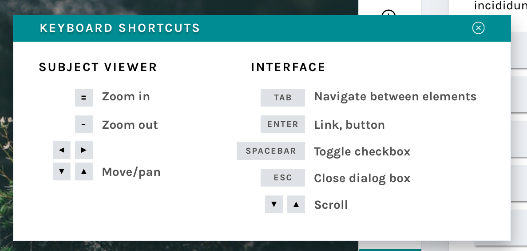
Many respondents to my 2017 design survey requested that they be able to use the keyboard to make classifications rather than having to click so many buttons. One volunteer actually called the classifier “a carpal-tunnel torturing device”. As a designer, that’s hard to hear – it’s never the goal to actively injure our volunteers.

We actually do support keyboard shortcuts! This survey helped us realize that we need to be better at sharing some of the tools our developers have built. The image above shows a newly designed Keyboard Shortcut information modal. This modal (or “popup”) is a great example of a few of the modals we’re building – you can leave it open and drag it around the interface while you work, so you’ll be able to quickly refer to it whenever you need.

This behavior will be mirrored in a few of the modals that are currently available to you:

  • Add to Favorites
  • Add to Collection / Create a New Collection
  • Subject Metadata
  • “Need Help?”

It will also be applied to a few new ones, including…

Field Guide

New field guide layout

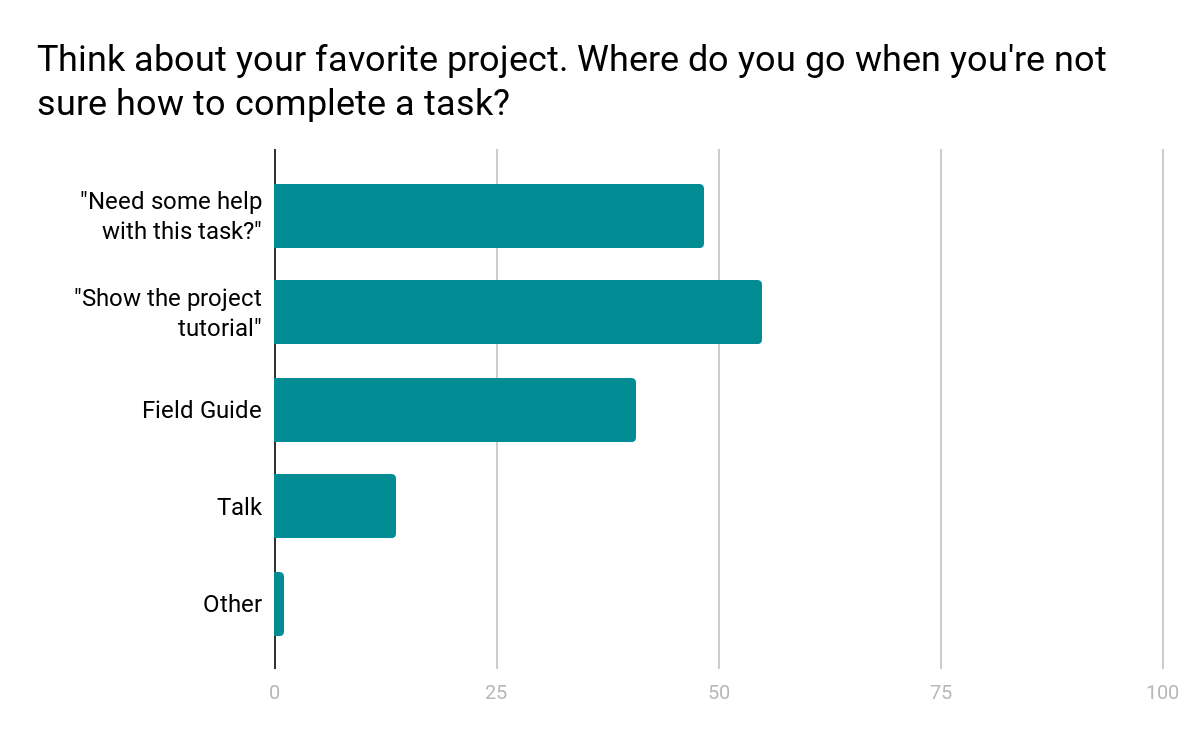
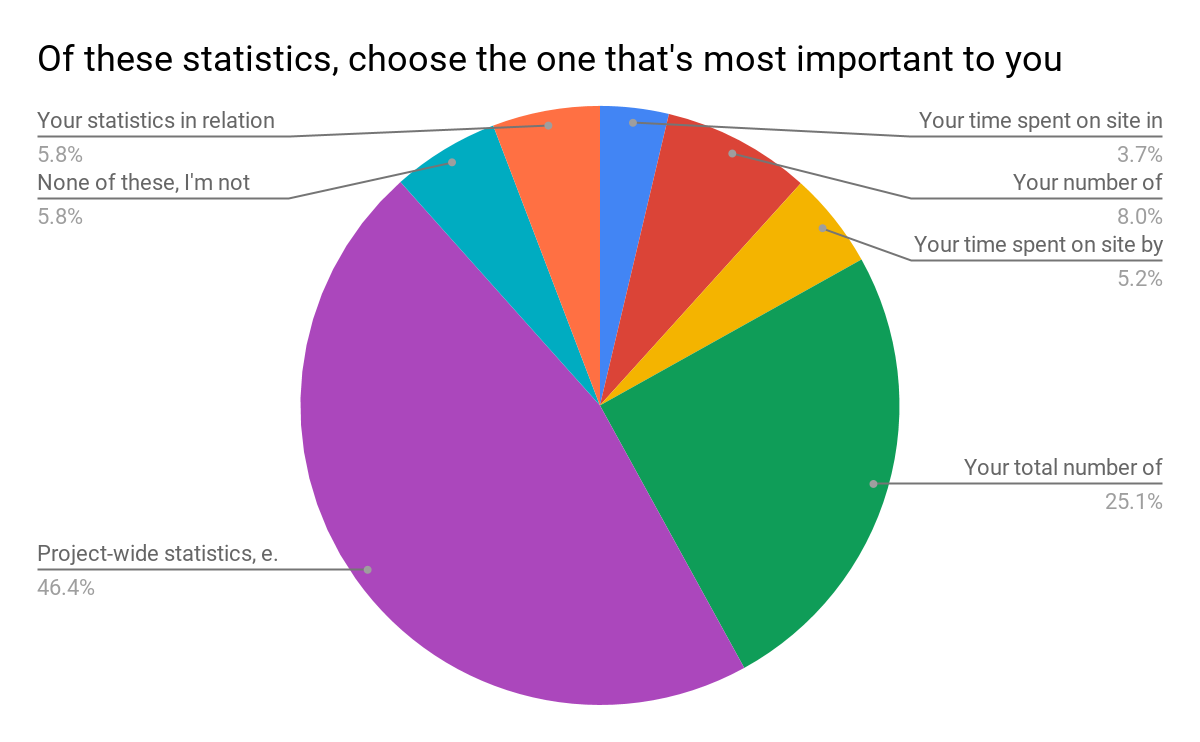
Another major finding from the design survey was that users did not have a clear idea where to go when they needed help with a task (see chart below).

Survey results show a mix of responses

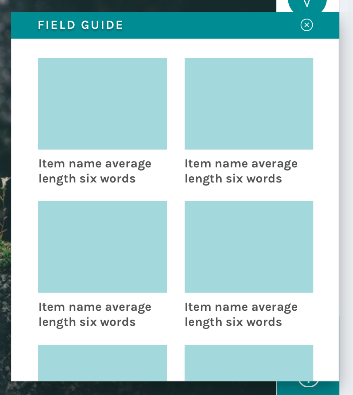
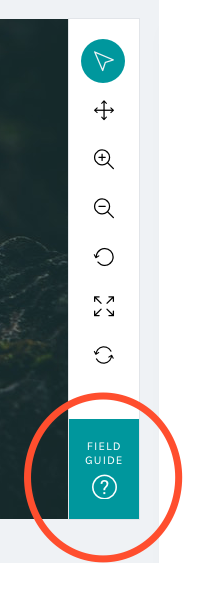
We know research teams often put a lot of effort into their help texts, and we wanted to be sure that work was reaching the largest possible audience. Hence, we moved the Field Guide from a small button on the right-hand side of the screen – a place that can become obscured by the browser’s scrollbar – and created a larger, more prominent button in the updated toolbar:

By placing the Field Guide button in a more prominent position and allowing the modal to stay open during classifications, we hope this tool will be taken advantage of more than it currently is.

The layout was the result of the audit of every live project I conducted in spring 2017:

Field Guide
Mode item count 5 Mode label word count 2
Min item count 2 Min label word count 2
Max items count 45 Max label word count 765

Using the mode gave me the basis on which to design; however, there’s quite a disparity between min and max amounts. Because of this disparity, we’ll be giving project owners with currently active projects a lot of warning before switching to the new layout, and they’ll have the option to continue to use the current Field Guide design if they’d prefer.

Tutorial

Another major resource Zooniverse offers its research teams and volunteers is the Tutorial. Often used to explain project goals, welcome new volunteers to the project, and point out what to look for in an image, the current tutorial is often a challenge because its absolute positioning on top of the subject image.

No more!

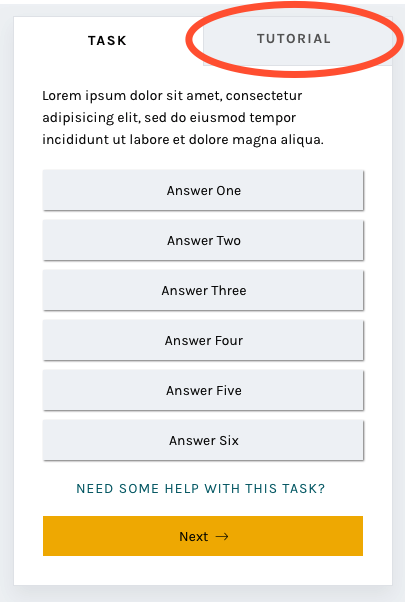
In this iteration of the classify interface, the tutorial opens once as a modal, just as it does now, and then lives in a tab in the task area where it’s much more easily accessible. You’ll be able to switch to the Tutorial tab in order to compare the example images and information with the subject image you’re looking at, rather than opening and closing the tutorial box many times.

A brand-new statistics section

Another major comment from the survey was that volunteers wanted more ways to interact with the Zooniverse. Thus, you’ll be able to scroll down to find a brand-new section! Features we’re adding will include:

  • Your previous classifications with Add to Favorites or Add to Collection buttons
  • Interesting stats, like the amount of classifications you’ve done and the amount of classifications your community have done
  • Links to similar projects you might be interested in
  • Links to the project’s blog and social media to help you feel more connected to the research team
  • Links to the project’s Talk boards, for a similar purpose
  • Possibly: A way to indicate that you’re finished for the day, giving you the option to share your experience on social media or find another project you’re interested in.

The statistics we chose were directly related to the responses from the survey:

Survey results

Respondents were able to choose more than one response; when asked to rank them in order of importance, project-wide statistics were chosen hands-down:

Project-wide statistics are the most important

We also heard that volunteers sometimes felt disconnected from research teams and the project’s accomplishments:

“In general there is too less information about the achievement of completed projects. Even simple facts could cause a bit of a success-feeling… how many pictures in this project over all have been classified? How much time did it take? How many hours were invested by all participating citizens? Were there any surprising things for the scientists? Things like that could be reported long before the task of a project is completely fullfilled.”

Research teams often spend hours engaged in dialog with volunteers on Talk, but not everyone who volunteers on Zooniverse is aware or active on Talk. Adding a module on the classify page showing recent Talk posts will bring more awareness to this amazing resource and hopefully encourage more engagement from volunteers.

Templates for different image sizes and dimensions

When the project builder was created, we couldn’t have predicted the variety of disparate topics that would become Zooniverse projects. Originally, the subject viewer was designed for one common image size, roughly 2×3, and other sizes have since been shoehorned in to fit as well as they can.

Now, we’d like to make it easier for subjects with extreme dimensions, multimedia subjects, and multi-image subjects to fit better within the project builder. By specifically designing templates and allowing project owners to choose the one that best fits their subjects, volunteers and project owners alike will have a better experience.

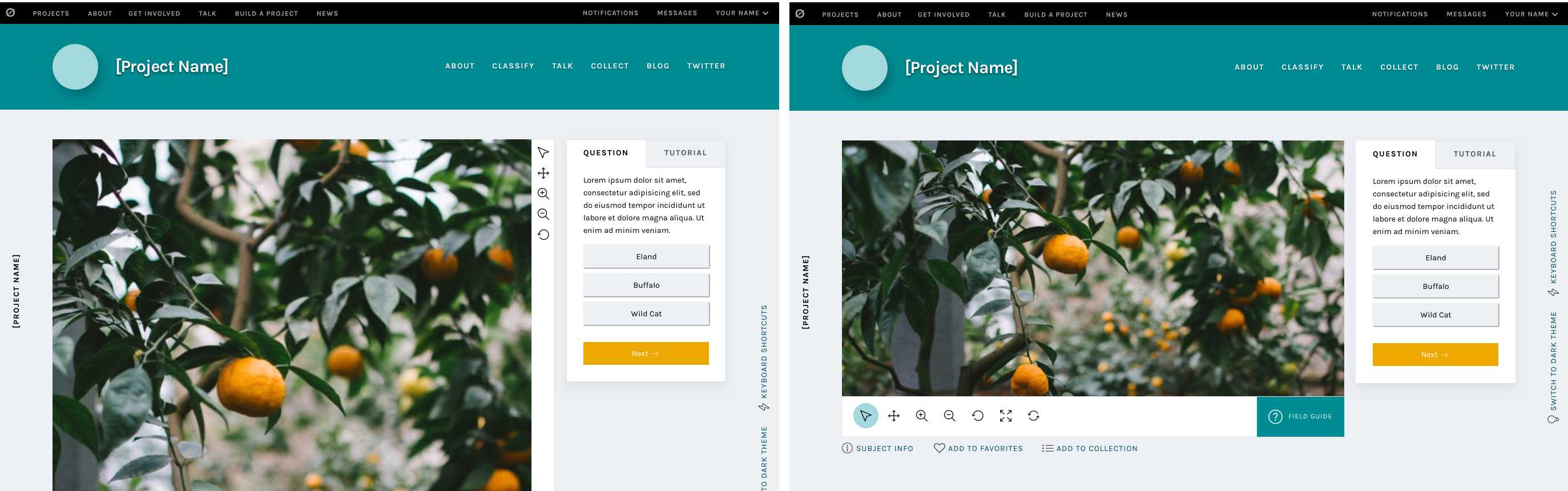
Very wide subjects will see their toolbar moved to the bottom of the image rather than on the right, to give the image as much horizontal space as possible. Tall subjects will be about the same width as they have been, but the task/tutorial box will stay fixed on the screen as the image scrolls, eliminating the need to scroll up and down as often when looking at the bottom of the subject.

Wide and tall subjects

Let’s get started!

I’m so excited for the opportunity to share a preview of these changes with you. Zooniverse is a collaborative project, so if there’s anything you’d like us to address as we implement this update, please use this survey to share your thoughts and suggestions. Since we’re rolling these out in pieces, it will be much easier for us to be able to iterate, test, and make changes.

We estimate that the updates will be mostly in place by early 2019, so there’s plenty of time to make sure we’re creating the best possible experience for everyone.

Thank you so much for your patience and understanding as we move forward. In the future, we’ll be as open and transparent as possible about this process.

What’s going on with the classify interface? Part One

Part one in a multi-part series exploring the visual and UX changes to the Zooniverse classify interface

First, an introduction.

Zooniverse began in 2007, with a galaxy-classifying project called Galaxy Zoo. The project was wildly successful, and one of the lead researchers, Chris Lintott, saw an opportunity to help other researchers accomplish similar goals. He assembled a team of developers and set to work building custom projects just like Galaxy Zoo for researchers around the world.

And things were good.

But the team started to wonder: How can we improve the process to empower researchers to build their own Zooniverse projects, rather than relying on the team’s limited resources to build their projects for them?

Thus, the project builder (zooniverse.org/lab) was born.

In the first year of its inception, the number of projects available to citizen scientist volunteers nearly doubled. Popularity spread, the team grew, and things seemed to be going well.

That’s where I come in. * Record scratch *

Three years after the project builder’s debut, I was hired as the Zooniverse designer. With eight years’ experience in a variety of design roles from newspaper page design to user experience for mobile apps to web design, I approached the new project builder-built projects with fresh eyes, taking a hard look at what was working and what areas could be improved.

Over the next week, I’ll be breaking down my findings and observations, and talking through the design changes we’re making, shedding more light on the aims and intentions behind these changes and how they will affect your experience on the Zooniverse platform.

If you take one thing away from this series it’s that this design update, in following with the ethos of Zooniverse, is an iterative, collaborative process. These posts represent where we are now, in June 2018, but the final product, after testing and hearing your input, may be different. We’re learning as we go, and your input is hugely beneficial as we move forward.

Here’s a link to an open survey in case you’d like to share thoughts, experiences, or opinions at any point.

Let’s dive in.

Part one: Research

My first few weeks on the job were spent exploring Zooniverse, learning about the amazing world of citizen science, and examining projects with similar task types from across the internet.

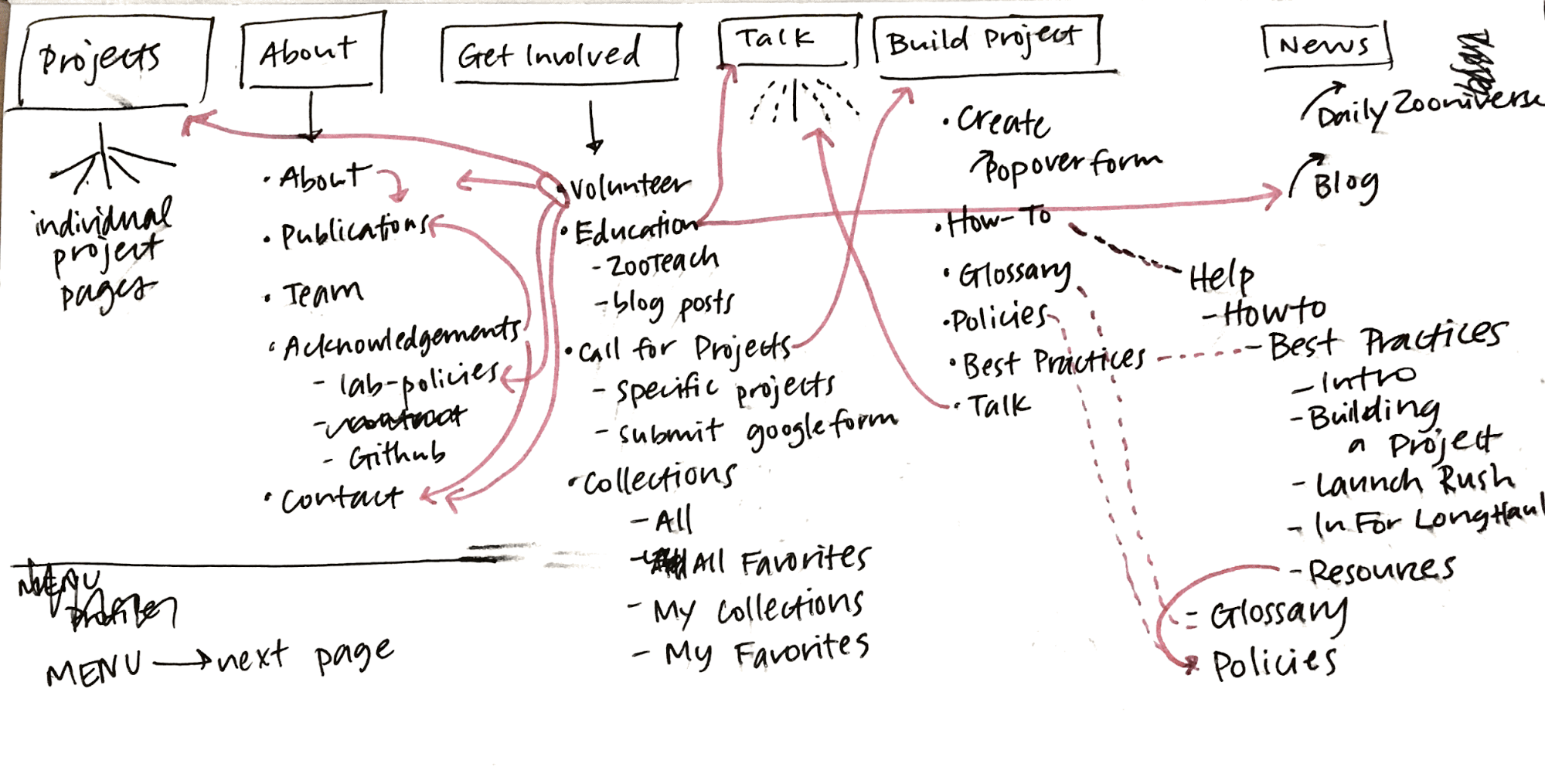
I did a large-scale analysis of the site in general, going through every page in each section and identifying areas with inconsistent visual styles or confusing user experiences.

Current site map, March 2017

Analysis of current template types

After my initial site analysis, I created a list of potential pages or sections that were good candidates for a redesign. The classify interface stood out as the best place to start, so I got to work.

Visual design research

First, I identified areas of the interface that could use visual updates. My main concerns were legibility, accessibility, and varying screen sizes. With an audience reaching to the tens of thousands per week, the demographic diversity makes for an interesting design challenge.

Next, I conducted a comprehensive audit of every project that existed on the Zooniverse in March 2017 (79 in total, including custom projects like Galaxy Zoo), counting question/task word count, the max number of answers, subject image dimensions, field guide content, and a host of other data points. That way, I could accurately design for the medians rather than choosing arbitrarily. When working on this scale, it’s important to use data like these to ensure that the largest possible group is well designed for.

Here are some selected data:

Task type: Drawing 20
Answers
Average number of possible answers 2 Answer average max word count 4.5
Min number 1 Answer max max word count 10
Max number 7 Answer min max word count 2
Median number 1 Answer median max word count 1
Number with thumbnail images 1


Task type: Question 9
Answers
Average number of possible answers 6 Answer average max word count 6
Min number 2 Answer max max word count 18
Max number 9 Answer min max word count 1
Median number 3.5 Answer median max word count 4
Number with thumbnail images 3


Task type: Survey 9
Answers
Average number of possible answers 31 Answer average max word count 4
Min number 6 Answer max max word count 7
Max number 60 Answer min max word count 3
Median number 29 Answer median max word count 4
Number with thumbnail images 9

Even More Research

Next, I focused on usability. To ensure that I understood issues from as many perspectives as possible, I sent a design survey to our beta testers mailing list, comprising about 100,000 volunteers (if you’re not already on the list, you can opt in via your Zooniverse email settings). Almost 1,200 people responded, and those responses informed the decisions I made and helped prioritize areas of improvement.

Here are the major findings from that survey:

  • No consensus on where to go when you’re not sure how to complete a task.
  • Many different destinations after finishing a task.
  • Too much scrolling and mouse movement.
  • Lack of keyboard shortcuts.
  • Would like the ability to view previous classifications.
  • Translations to more languages.
  • Need for feedback when doing classifications.
  • Finding new projects that might also be interesting.
  • Larger images.

In the next few blog posts, I’ll be breaking down specific features of the update and showing how these survey findings help inform the creation of many of the new features.

Without further ado

Basic classify template

Some of these updates will look familiar, as we’ve already started to implement style and layout adjustments. I’ll go into more detail in subsequent posts, but at a high level, these changes seek to improve your overall experience classifying on the site no matter where you are, what browser you’re using, or what type of project you’re working on.  

Visually, the site is cleaner and more professional, a reflection of Zooniverse’s standing in the citizen science community and of the real scientific research that’s being done. Studies have shown that good, thoughtful design influences a visitor’s perceptions of a website or product, sometimes obviously, sometimes at a subliminal level. By making thoughtful choices in the design of our site, we can seek to positively affect audience perceptions about Zooniverse, giving volunteers and researchers even more of a reason to feel proud of the projects they’re passionate about.

It’s important to note that this image is a reflection of our current thought, in June 2018, but as we continue to test and get feedback on the updates, the final design may change. One benefit to rolling updates out in pieces is the ability to quickly iterate ideas until the best solution is found.

The timeline

We estimate that the updates will be mostly in place by early 2019.

This is due in part to the size of our team. At most, there are about three people working on these updates while also maintaining our commitments to other grant-funded projects and additional internal projects. The simple truth is that we just don’t have the resources to be able to devote anyone full-time to this update.

The timeline is also influenced in a large part by the other half of this update: A complete overhaul of the infrastructure of the classifier. These changes aren’t as visible, but you’ll notice an improvement in speed and functionality that is just as important as the “facelift” portion of the update.

Stay tuned!

We’ve seen your feedback on Talk, via email, and on Github, and we’re happy to keep a dialog going about subsequent updates. To streamline everything and make sure your comments don’t get missed, please only use this survey link to post thoughts moving forward.

Measuring Success in Citizen Science Projects, Part 2: Results

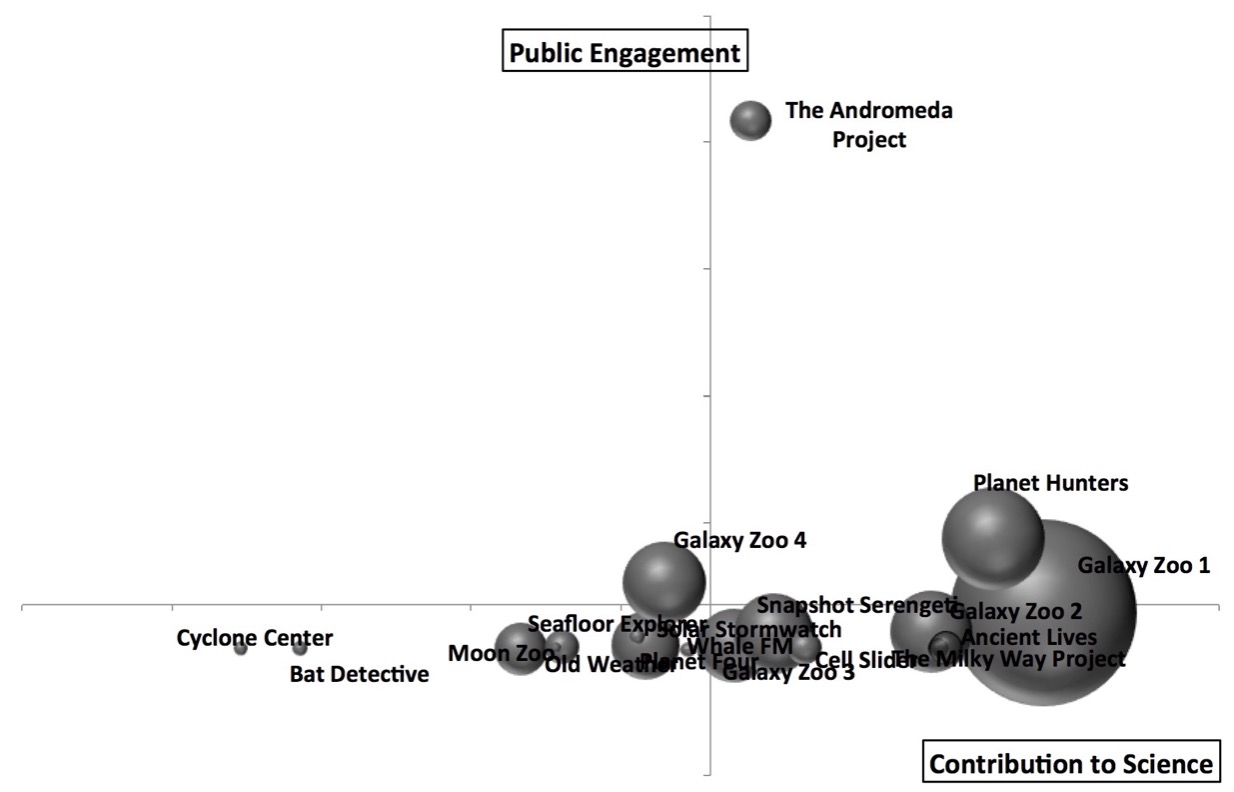
In the previous post, I described the creation of the Zooniverse Project Success Matrix from Cox et al. (2015). In essence, we examined 17 (well, 18, but more on that below) Zooniverse projects, and for each of them combined 12 quantitative measures of performance into one plot of Public Engagement versus Contribution to Science:

Public engagement vs Contribution to science : the success matrix
Public Engagement vs Contribution to Science for 17 Zooniverse projects. The size (area) of each point is proportional to the total number of classifications received by the project. Each axis of this plot combines 6 different quantitative project measures.

The aim of this post is to answer the questions: What does it mean? And what doesn’t it mean?

Discussion of Results

The obvious implication of this plot and of the paper in general is that projects that do well in both public engagement and contribution to science should be considered “successful” citizen science projects. There’s still room to argue over which is more important, but I personally assert that you need both in order to justify having asked the public to help with your research. As a project team member (I’m on the Galaxy Zoo science team), I feel very strongly that I have a responsibility both to use the contributions of my project’s volunteers to advance scientific research and to participate in open, two-way communication with those volunteers. And as a volunteer (I’ve classified on all the projects in this study), those are the 2 key things that I personally appreciate.

It’s apparent just from looking at the success matrix that one can have some success at contributing to science even without doing much public engagement, but it’s also clear that every project that successfully engages the public also does very well at research outputs. So if you ignore your volunteers while you write up your classification-based results, you may still produce science, though that’s not guaranteed. On the other hand, engaging with your volunteers will probably result in more classifications and better/more science.

Surprises, A.K.A. Failing to Measure the Weather

Some of the projects on the matrix didn’t appear quite where we expected. I was particularly surprised by the placement of Old Weather. On this matrix it looks like it’s turning in an average or just-below-average performance, but that definitely seems wrong to me. And I’m not the only one: I think everyone on the Zooniverse team thinks of the project as a huge success. Old Weather has provided robust and highly useful data to climate modellers, in addition to uncovering unexpected data about important topics such as the outbreak and spread of disease. It has also provided publications for more “meta” topics, including the study of citizen science itself.

Additionally, Old Weather has a thriving community of dedicated volunteers who are highly invested in the project and highly skilled at their research tasks. Community members have made millions of annotations on log data spanning centuries, and the researchers keep in touch with both them and the wider public in multiple ways, including a well-written blog that gets plenty of viewers. I think it’s fair to say that Old Weather is an exceptional project that’s doing things right. So what gives?

There are multiple reasons the matrix in this study doesn’t accurately capture the success of Old Weather, and they’re worth delving into as examples of the limitations of this study. Many of them are related to the project being literally exceptional. Old Weather has crossed many disciplinary boundaries, and it’s very hard to put such a unique project into the same box as the others.

Firstly, because of the way we defined project publications, we didn’t really capture all of the outputs of Old Weather. The use of publications and citations to quantitatively measure success is a fairly controversial subject. Some people feel that refereed journal articles are the only useful measure (not all research fields use this system), while others argue that publications are an outdated and inaccurate way to measure success. For this study, we chose a fairly strict measure, trying to incorporate variations between fields of study but also requiring that publications should be refereed or in some other way “accepted”. This means that some projects with submitted (but not yet accepted) papers have lower “scores” than they otherwise might. It also ignores the direct value of the data to the team and to other researchers, which is pretty punishing for projects like Old Weather where the data itself is the main output. And much of the huge variety in other Old Weather outputs wasn’t captured by our metric. If it had been, the “Contribution to Science” score would have been higher.

Secondly, this matrix tends to favor projects that have a large and reasonably well-engaged user base. Projects with a higher number of volunteers have a higher score, and projects where the distribution of work is more evenly spread also have a higher score. This means that projects where a very large fraction of the work is done by a smaller group of loyal followers are at a bit of a disadvantage by these measurements. Choosing a sweet spot in the tradeoff between broad and deep engagement is a tricky task. Old Weather has focused on, and delivered, some of the deepest engagement of all our projects, which meant these measures didn’t do it justice.

To give a quantitative example: the distribution of work is measured by the Gini coefficient (on a scale of 0 to 1), and in our metric lower numbers, i.e. more even distributions, are better. The 3 highest Gini coefficients in the projects we examined were Old Weather (0.95), Planet Hunters (0.93), and Bat Detective (0.91); the average Gini coefficient across all projects was 0.82. It seems clear that a future version of the success matrix should incorporate a more complex use of this measure, as very successful projects can have high Gini coefficients (which is another way of saying that a loyal following is often a highly desirable component of a successful citizen science project).

Thirdly, I mentioned in part 1 that these measures of the Old Weather classifications were from the version of the project that launched in 2012. That means that, unlike every other project studied, Old Weather’s measures don’t capture the surge of popularity it had in its initial stages. To understand why that might make a huge difference, it helps to compare it to the only eligible project that isn’t shown on the matrix above: The Andromeda Project.

In contrast to Old Weather, The Andromeda Project had a very short duration: it collected classifications for about 4 weeks total, divided over 2 project data releases. It was wildly popular, so much so that the project never had a chance to settle in for the long haul. A typical Zooniverse project has a burst of initial activity followed by a “long tail” of sustained classifications and public engagement at a much lower level than the initial phase.

The Andromeda Project is an exception to all the other projects because its measures are only from the initial surge. If we were to plot the success matrix including The Andromeda Project in the normalizations, the plot looks like this:

success matrix with the andromeda project making all the others look like public engagement failures
And this study was done before the project’s first paper was accepted, which it has now been. If we included that, The Andromeda Project’s position would be even further to the right as well.

Because we try to control for project duration, the very short duration of the Andromeda Project means it gets a big boost. Thus it’s a bit unfair to compare all the other projects to The Andromeda Project, because the data isn’t quite the same.

However, that’s also true of Old Weather — but instead of only capturing the initial surge, our measurements for Old Weather omit it. These measurements only capture the “slow and steady” part of the classification activity, where the most faithful members contribute enormously but where our metrics aren’t necessarily optimized. That unfairly makes Old Weather look like it’s not doing as well.

In fact, comparing these 2 projects has made us realize that projects probably move around significantly in this diagram as they evolve. Old Weather’s other successes aren’t fully captured by our metrics anyway, and we should keep those imperfections and caveats in mind when we apply this or any other success measure to citizen science projects in the future; but one of the other things I’d really like to see in the future is a study of how a successful project can expect to evolve across this matrix over its life span.

Why do astronomy projects do so well?

There are multiple explanations for why astronomy projects seem to preferentially occupy the upper-right quadrant of the matrix. First, the Zooniverse was founded by astronomers and still has a high percentage of astronomers or ex-astronomers on the payroll. For many team members, astronomy is in our wheelhouse, and it’s likely this has affected decisions at every level of the Zooniverse, from project selection to project design. That’s starting to change as we diversify into other fields and recruit much-needed expertise in, for example, ecology and the humanities. We’ve also launched the new project builder, which means we no longer filter the list of potential projects: anyone can build a project on the Zooniverse platform. So I think we can expect the types of projects appearing in the top-right of the matrix to broaden considerably in the next few years.

The second reason astronomy seems to do well is just time. Galaxy Zoo 1 is the first and oldest project (in fact, it pre-dates the Zooniverse itself), and all the other Galaxy Zoo versions were more like continuations, so they hit the ground running because the science team didn’t have a steep learning curve. In part because the early Zooniverse was astronomer-dominated, many of the earliest Zooniverse projects were astronomy related, and they’ve just had more time to do more with their big datasets. More publications, more citations, more blog posts, and so on. We try to control for project age and duration in our analysis, but it’s possible there are some residual advantages to having extra years to work with a project’s results.

Moreover, those early astronomy projects might have gotten an additional boost from each other: they were more likely to be popular with the established Zooniverse community, compared to similarly early non-astronomy projects which may not have had such a clear overlap with the established Zoo volunteers’ interests.

Summary

The citizen science project success matrix presented in Cox et al. (2015) is the first time such a diverse array of project measures have been combined into a single matrix for assessing the performance of citizen science projects. We learned during this study that public engagement is well worth the effort for research teams, as projects that do well at public engagement also make better contributions to science.

It’s also true that this matrix, like any system that tries to distill such a complex issue into a single measure, is imperfect. There are several ways we can improve the matrix in the future, but for now, used mindfully (and noting clear exceptions), this is generally a useful way to assess the health of a citizen science project like those we have in the Zooniverse.

Note: Part 1 of this article is here.

Measuring Success in Citizen Science Projects, Part 1: Methods

What makes one citizen science project flourish while another flounders? Is there a foolproof recipe for success when creating a citizen science project? As part of building and helping others build projects that ask the public to contribute to diverse research goals, we think and talk a lot about success and failure at the Zooniverse.

But while our individual definitions of success overlap quite a bit, we don’t all agree on which factors are the most important. Our opinions are informed by years of experience, yet before this year we hadn’t tried incorporating our data into a comprehensive set of measures — or “metrics”. So when our collaborators in the VOLCROWE project proposed that we try to quantify success in the Zooniverse using a wide variety of measures, we jumped at the chance. We knew it would be a challenge, and we also knew we probably wouldn’t be able to find a single set of metrics suitable for all projects, but we figured we should at least try to write down one possible approach and note its strengths and weaknesses so that others might be able to build on our ideas.

The results are in Cox et al. (2015):

Defining and Measuring Success in Online Citizen Science: A Case Study of Zooniverse Projects

In this study, we only considered projects that were at least 18 months old, so that all the projects considered had a minimum amount of time to analyze their data and publish their work. For a few of our earliest projects, we weren’t able to source the raw classification data and/or get the public-engagement data we needed, so those projects were excluded from the analysis. We ended up with a case study of 17 projects in all (plus the Andromeda Project, about which more in part 2).

The full paper is available here (or here if you don’t have academic institutional access), and the purpose of these blog posts is to summarize the method and discuss the implications and limitations of the results. Continue reading Measuring Success in Citizen Science Projects, Part 1: Methods

Who Are The Zooniverse Community? We Asked Them…

We are often asked who our community are by project scientists, sociologists, and by the community itself. A recent Oxford study tried to find out, and working with them we conducted a survey of volunteers. The results were interesting and when combined with various statistics that we have at Zooniverse (web logs, analytics, etc) we can start to see a pretty good picture of who volunteers at the Zooniverse.

Much of what follows comes from a survey was conducted last Summer as part of Masters student Victoria Homsy’s thesis, though the results are broadly consistent with other surveys we have performed.  We asked a small subset of the Zooniverse community to answer an online questionnaire. We contacted about 3000 people regarding the survey and around 300 responded. They were not a random sample of users, rather they were people who had logged-in to the Zooniverse at least once in the three months before we emailed them.

The remaining aspects of this post involve data gathered by our own system (classification counts, log-in rates, etc) and data from our use of Google Analytics.

So with that preamble done: let’s see who you are…

https://vimeo.com/99664654

This visualisation is of Talk data from last Summer. It doesn’t cover every project (e.g. Planet Hunters is missing) but it gives you a good flavour for how our community is structured. Each node (circle) is one volunteer, sized proportionally according to how many posts they have made overall. You can see one power-mod who has commented more than 16,000 times on Talk near the centre. Volunteers are connected to others by talking in the same threads (a proxy for having conversations). They have been automatically coloured by network analysis, to reflect sub-networks within the Zooniverse as a whole. The result is that we see the different projects’ Talk sites.

talk-central

There are users that rise largely out of those sub-communities and talk across many sites, but mostly people stick to one group. You can also see how relatively few power users help glue the whole together, and how there are individuals talking to large numbers of others, who in turn may not participate much otherwise – these are likely examples of experienced users answering questions from others.

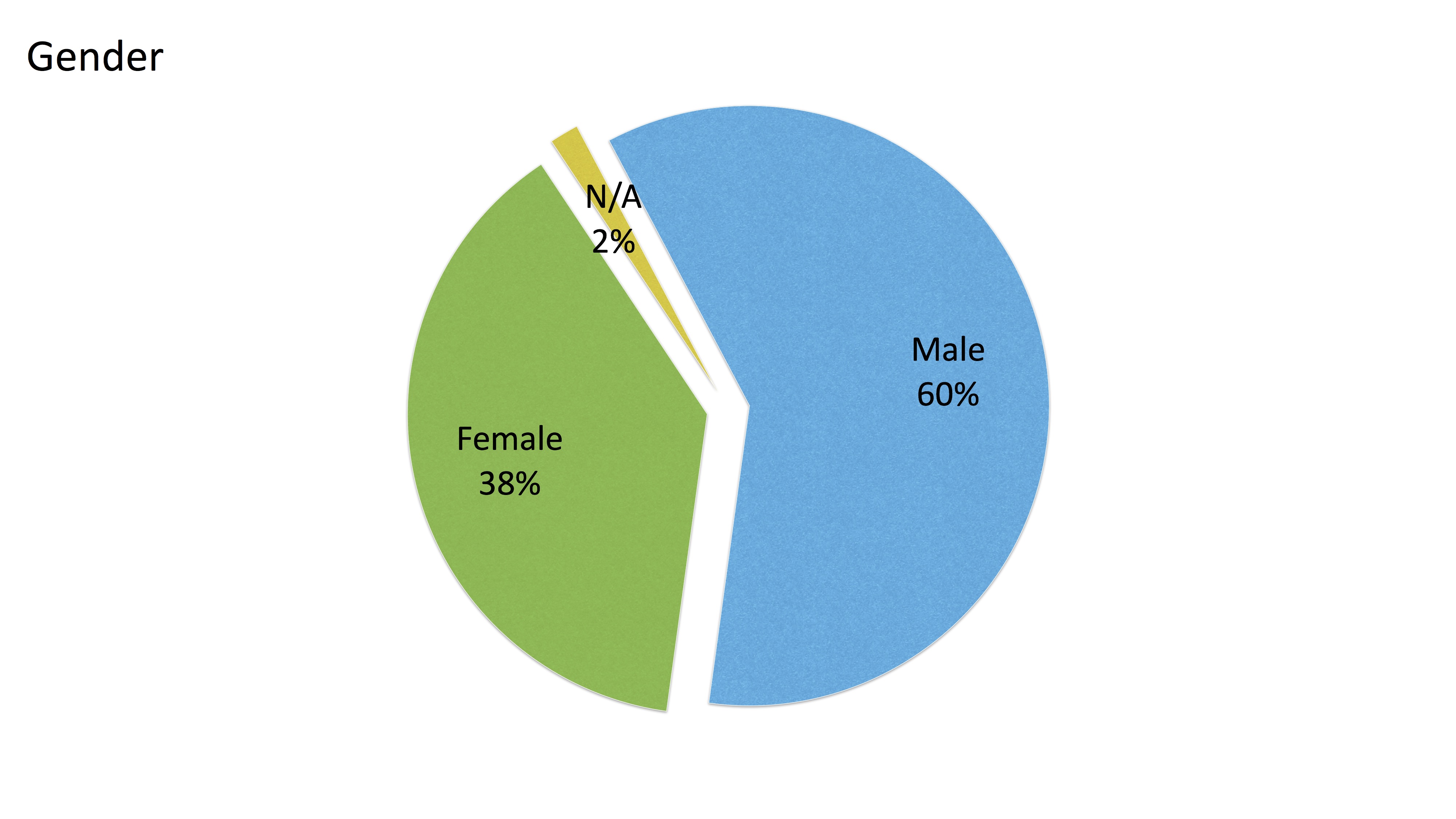
gender One thing we can’t tell from our own metrics is a person’s gender, but we did ask in the survey. The Zooniverse community seems to be in a 60/40 split, which in some ways is not as bad as I would have thought. However, we can do better, and this provides a metric to measure ourselves against in the future.

ages

It is also interesting to note that there is very little skew in the ages of our volunteers. There is a slight tilt away from older people, but overall the community appears to be made up of people of all ages. This reflects the experience of chatting to people on Talk.

geo-pie

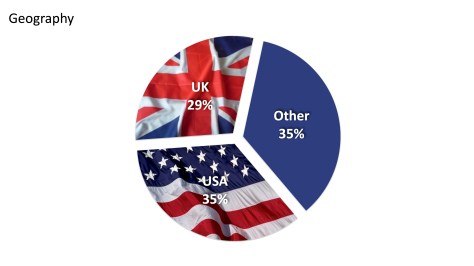
We know that the Zooniverse is English-language dominated, and specifically UK/US dominated. This is always where we have found the best press coverage, and where we have the most links ourselves. The breakdown between US/UK/the rest is basically a three-way split. This split is seen not just in this survey but also generally in our analytics overall.

geo-pie-dev

Only 2% of the users responding to our survey only came from the developing world. As you can see in a recent blog post, we do get visitors from all over the world. It may be that the survey has the effect of filtering out these people (it was conducted via an online form), or maybe that there is language barrier.

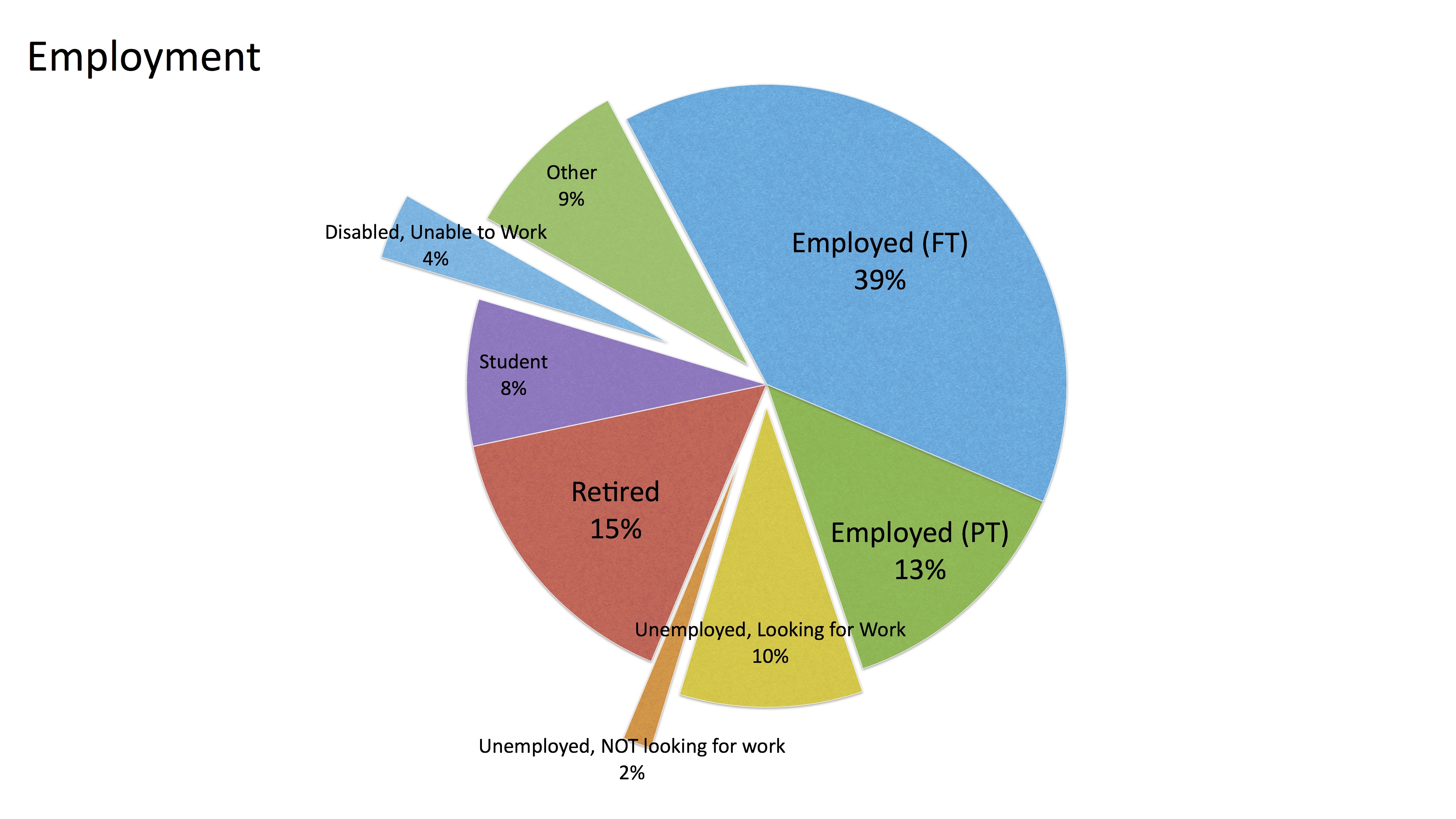
employmentemployment_cloudWe also asked people about their employment status. We find a about half of our community is employed (either full- or part-time). Looking at the age distribution, we might expect up a fifth or sixth of people to be retired (15% is fairly close). This leaves us with about 10% unemployed, nearly twice the UK or US unemployment rate, and about 4% unable to work due to disability (about the UK averaged, by comparison). This is interesting, especially in relation to the next question, on motivation for participating.

We also asked them to tell us what they do and the result is the above word cloud (thanks, Wordle!) which shows a wonderful array of occupations including professor, admin, guard, and dogsbody. You should note a high instance of technical jobs on this list, possibly indicating that people need to have, or be near, a computer to work on Zooniverse projects in their daily life.

motivation

When asked why they take part in Zooniverse projects we find that the most-common response (91%) is a desire to contribute to progress. How very noble. Closely following that (84%) are the many people who are interested in the subject matter. It falls of rapidly then to ‘entertainment’, ‘distraction’ and ‘other’. We are forever telling people that the community is motivated mainly by science and contribution, and for whatever reason they usually don’t believe us. It’s nice to see this result reproducing an important part of the Raddick et. al. 2009 study, which first demonstrated it.

when-to-classfy-routine

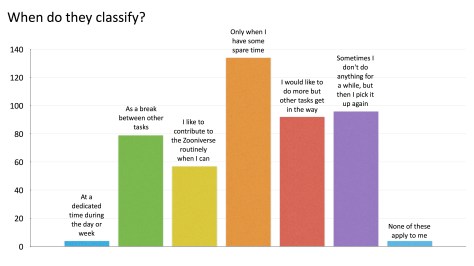
It is roughly what I would have expected to see that people tend to classify mostly in their spare time, and that most don’t have dedicated ‘Zooniverse’ time every day. It’s more interesting to see why, if they tend to stop and start, i.e. if they answered in the purple category above. Here is a word cloud showing the reason people stop participating in Zooniverse. TL;DR they have the rest of their life to get on with.

when-to-classfy-routine-cloud

We’ll obviously have to fix this by making Zooniverse their whole life!

This is my final blog post as a part of the Zooniverse team. It has been by pleasure to work at the Zooniverse for the last five years. Much of that time has been spent trying to motivate and engage the amazing community of volunteers who come to click, chat, and work on all our projects. You’re an incredible bunch, motivated by science and a desire to be part of something important and worthwhile online. I think you’re awesome. In the last five years I have seen the Zooniverse grow into a community of more than one million online volunteers, willing to tackle big questions, and trying and understand the world around us.

Thank you for your enthusiasm and your time. I’ll see you online…

Introducing VOLCROWE – Volunteer and Crowdsourcing Economics

volcrowe

Hi everyone, I’d like to let you know about a cool new project we are involved with. VOLCROWE is a three year research project funded by the Engineering and Physical Sciences Research Council in the UK, bringing together a team of researchers (some of which are already involved with the Zooniverse, like Karen Masters) from the Universities of Portsmouth, Oxford, Manchester and Leeds. The PI of the project Joe Cox says “Broadly speaking, the team wants to understand more about the economics of the Zooniverse, including how and why it works in the way that it does. Our goal is to demonstrate to the community of economics and management scholars the increasingly amazing things that groups of people can achieve when they work together with a little help from technology. We believe that Zooniverse projects represent a specialised form of volunteering, although the existing literature on the economics of altruism hasn’t yet taken into account these new ways in which people can give their time and energy towards not-for-profit endeavours. Working together with Zooniverse volunteers, we intend to demonstrate how the digital economy is making it possible for people from all over the world to come together in vast numbers and make a contribution towards tackling major scientific problems such as understanding the nature of the Universe, climate change and even cancer.

These new forms of volunteering exemplified by the Zooniverse fundamentally alter the voluntary process as it is currently understood. The most obvious change relates to the ways in which people are able to give their time more flexibly and conveniently; such as contributing during their daily commute using a smart phone! It also opens new possibilities for the social and community aspects of volunteering in terms of creating a digitally integrated worldwide network of contributors. It may also be the case that commonly held motivations and associations with volunteering don’t hold or work differently in this context. For example, religious affiliations and memberships may or may not be as prevalent as they are with more traditional or recognised forms of volunteering. With the help of Zooniverse volunteers, the VOLCROWE team are exploring all of these issues (and more) with the view to establishing new economic models of digital volunteering.

To achieve this aim, we are going to be interacting with the Zooniverse community in a number of ways. First, we’ll be conducting a large scale survey to find out more about its contributors (don’t worry – you do not have to take part in the survey or give any personal information if you do not want to!). The survey data will be used to test the extent to which assumptions made by existing models of volunteering apply and, if necessary, to formulate new ones. We’ll also be taking a detailed look at usage statistics from a variety of projects and will test for trends in the patterns of contributions across the million (and counting) registered Zooniverse volunteers. This larger-scale analysis will be supplemented with a number of smaller sessions with groups of volunteers to help develop a more nuanced understanding of people’s relationships with and within the Zooniverse. Finally, we’ll be using our expertise from the economic and management sciences to study the organisation of the Zooniverse team themselves and analyse the ways and channels they use to communicate and to make decisions. In short, with the help of its volunteers, we want to find out what makes the Zooniverse tick!

In the survey analysis, no information will be collected that could be used to identify you personally. The only thing we will ask for is a Zooniverse ID so that we can match up your responses to your actual participation data; this will help us address some of the project’s most important research questions. The smaller group and one-to-one sessions will be less anonymous by their very nature, but participation will be on an entirely voluntary basis and we will only ever use the information we gather in a way in which you’re comfortable. The team would really appreciate your support and cooperation in helping us to better understand the processes and relationships that drive the Zooniverse. If we can achieve our goals, we may even be able to help to make it even better!”

Keep an eye out for VOLCROWE over the coming weeks and months; they’d love you to visit their website and follow them on Twitter.

Grant and the Zooniverse Team