I wanted to let you know that a new company called 1715 Labs has been set up to make commercial use of the software created by the Zooniverse team. Specifically, the company will explore how other businesses might make use of our tools in order to classify and label images, text, audio and video.
We’ve been approached over the years by a number of companies with such projects in mind, but the Zooniverse policy has always been to accept only projects whose aim is academic research. (See our policy statement at https://www.zooniverse.org/help/lab-policies).
This is not changing. This policy will remain the same for Zooniverse projects, so you can be sure that any project you see at Zooniverse.org will continue to have as its goal the advancement of academic research. Projects developed by 1715 Labs will not appear at Zooniverse.org.
It’s also important that you, the volunteers, know that the Zooniverse will not be handing the new company any of your data or personal information. Indeed, according to the Zooniverse privacy policy we will not be able to. Instead, the company will use the same software as the Zooniverse to reach other crowds who can take part in any projects it creates.
The team who have been working on the Zooniverse will continue to do so, just as they always have. However, the possibility exists that some team members – including myself – may serve as paid consultants for 1715 Labs as the new company gets off the ground. This work will be managed separately from work for us in the Zooniverse.
1715 Labs is formally a spin-out company of the University of Oxford, where a large part of the Zooniverse team have been based from the beginning. It is currently led by Sophie Hackford (We’re currently recruiting a long-term CEO – if you’re interested, send me a CV). Normally, the researchers involved in leading such a spin-out would receive equity in the new company, and benefit financially from it.
However, in this case, we have given up any such rights, passing the shares instead to another new organisation, the 1715 Association. This means – unusually for a spin out company – no-one involved in Zooniverse owns shares or has a financial stake in the new company. (As noted above, some of the team may end up working for 1715 labs as consultants).
The 1715 Association is what’s known as a company limited by guarantee. If it receives money as a result of its ownership of shares in 1715 Labs, it must use it in accordance with its objects. The objects of the 1715 Association are to benefit citizen science research, especially through the Zooniverse. Should the company do well, therefore, the result will be additional funding for our work here at Zooniverse.org and the chance to build new, better, more interesting projects.
This is good news – we want the excellent software our developers have created to be used, and if it can benefit our research, then so much the better. Hopefully, businesses with data that needs labelling will be inspired by this link to the Zooniverse to work with 1715 Labs.
I’m looking forward to seeing what happens with this new venture. In the meantime, I’m happy to answer any questions in the comments below or over on Talk.
Hot on the heels of last week’s update, I’ve just released version 1.0.3 of the Python Panoptes Client, which fixes a bug introduced in the previous release. If you encounter a TypeError when you try to create subjects, please update to this new version and that should fix it.
This release also updates the default client ID that is used to identify the client to the Panoptes API. This is to ensure that each of our API clients is using a unique ID.
As before, you can install the update by running pip install -U panoptes-client.
Occasionally we run studies in collaboration with external researchers in order to better understand our community and improve our platform. These can involve methods such as A/B splits, where we show a slightly different version of the site to one group of volunteers and measure how it affects their participation, e.g. does it influence how many classifications they make or their likelihood to return to the project for subsequent sessions?
One example of such a study was the messaging experiment we ran on Galaxy Zoo. We worked with researchers from Ben Gurion University and Microsoft research to test if the specific content and timing of messages presented in the classification interface could help alleviate the issue of volunteers disengaging from the project. You can read more about that experiment and its results in this Galaxy Zoo blog post https://blog.galaxyzoo.org/2018/07/12/galaxy-zoo-messaging-experiment-results/.
As the Zooniverse has different teams based at different institutions in the UK and the USA, the procedures for ethics approval differ depending on who is leading the study. After recent discussions with staff at the University of Oxford ethics board, to check our procedure was up to date, our Oxford-based team will be changing the way in which we gain approval for, and report the completion of these types of studies. All future study designs which feature Oxford staff taking part in the analysis will be submitted to CUREC, something we’ve been doing for the last few years. From now on, once the data gathering stage of the study has been run we will provide all volunteers involved with a debrief message.
The debrief will explain to our volunteers that they have been involved in a study, along with providing information about the exact set-up of the study and what the research goals were. The most significant change is that, before the data analysis is conducted, we will contact all volunteers involved in the study allow a period of time for them to state that they would like to withdraw their consent to the use of their data. We will then remove all data associated with any volunteer who would not like to be involved before the data is analysed and the findings are presented. The debrief will also contain contact details for the researchers in the event of any concerns and complaints. You can see an example of such a debrief in our original post about the Galaxy Zoo messaging experiment here https://blog.galaxyzoo.org/2015/08/10/messaging-test/.
As always, our primary focus is the research being enabled by our volunteer community on our individual projects. We run experiments like these in order to better understand how to create a more efficient and productive platform that benefits both our volunteers and the researchers we support. All clicks that are made by our volunteers are used in the science outcomes from our projects no matter whether they are part of an A/B split experiment or not. We still strive never to waste any volunteer time or effort.
We thank you for all that you do, and for helping us learn how to build a better Zooniverse.
Hello, my name is Sophia Vaughan, I’m a Physics student from Oxford University but I don’t spend all of my time studying physics, I also like to knit and go to science fiction conventions (especially Star Trek ones).
I’m posting on this blog because I’ve just started a summer project here at Zooniverse and while I’m here hoping to create a new project for the Zooniverse. But don’t worry you don’t need to be a scientist, student or a professor to create a project, all you need is Zooniverse account! If all goes well you’ll see future blog post(s) from me on how to build your own project for using the project builder.
Last month I gave a talk at the Wetton Workshop in Oxford. Unlike the other talks that week, mine wasn’t about astronomy. I was talking about Docker – a useful tool which has become popular among people who run web services. We use it for practically everything here, and it’s pretty clear that researchers would find it useful if only more of them used it. That’s especially true in fields like astronomy, where a lot of people write their own code to process and analyse their data. If after reading this post you think you’d like to give Docker a try and you’d like some help getting started, just get in touch and I’ll be happy to help.
I’m going to give a brief outline of what Docker is and why it’s useful, but first let’s set the scene. You’re trying to run a script in Python that needs a particular version of NumPy. You install that version but it doesn’t seem to work. Or you already have a different version installed for another project and can’t change it. Or the version it needs is really old and isn’t available to download anymore. You spend hours installing different combinations of packages and eventually you get it working, but you’re not sure exactly what fixed it and you couldn’t repeat the same steps in the future if you wanted to exactly reproduce the environment you’re now working in.
Many projects require an interconnected web of dependencies, so there are a lot of things that can go wrong when you’re trying to get everything set up. There are a few tools that can help with some of these problems. For Python you can use virtual environments or Anaconda. Some languages install dependencies in the project directory to avoid conflicts, which can cause its own problems. None of that helps when the right versions of packages are simply not available any more, though, and none of those options makes it easy to just download and run your code without a lot of tedious setup. Especially if the person downloading it isn’t already familiar with Python, for example.
If people who download your code today can struggle to get it running, how will it be years from now when the version of NumPy you used isn’t around anymore and the current version is incompatible? That’s if there even is a current version after so many years. Maybe people won’t even be using Python then.
Luckily there is now a solution to all of this, and it’s called software containers. Software containers are a way of packaging applications into their own self-contained environment. Everything you need to run the application is bundled up with the application itself, and it is isolated from the rest of the operating system when it runs. You don’t need to install this and that, upgrade some other thing, check the phase of the moon, and hold your breath to get someone’s code running. You just run one command and whether the application was built with Python, Ruby, Java, or some other thing you’ve never heard of, it will run as expected. No setup required!
Docker is the most well-known way of running containers on your computer. There are other options, such as Kubernetes, but I’m only going to talk about Docker here.
Using containers could seriously improve the reproducibility of your research. If you bundle up your code and data in a Docker image, and publish that image alongside your papers, anyone in the world will be able to re-run your code and get the same results with almost no effort. That includes yourself a few years from now, when you don’t remember how your code works and half of its dependencies aren’t available to install any more.
There is a growing movement for researchers to publish not just their results, but also their raw data and the code they used to process it. Containers are the perfect mechanism for publishing both of those together. A search of arXiv shows there have only been 40 mentions of Docker in papers across all fields in the past year. For comparison there have been 474 papers which mention Python, many of which (possibly most, but I haven’t counted) are presenting scripts and modules created by the authors. That’s without even mentioning other programming languages. This is a missed opportunity, given how much easier it would be to run all this code if the authors provided Docker images. (Some of those authors might provide Docker images without mentioning it in the paper, but that number will be small.)
Docker itself is open source, and all the core file formats and designs are standardised by the Open Container Initiative. Besides Docker, other OCI members include tech giants such as Amazon, Facebook, Microsoft, Google, and lots of others. The technology is designed to be future proof and it isn’t going away, and you won’t be locked into any one vendor’s products by using it. If you package your software in a Docker container you can be reasonably certain it will still run years, or decades, from now. You can install Docker for free by downloading the community edition.
So how might Docker fit into your workday? Your development cycle will probably look something like this: First you’ll probably outline an initial version of the code, and then write a Dockerfile containing the instructions for installing the dependencies and running the code. Then it’s basically the same as what you’d normally do. As you’re working on the code, you’d iterate by building an image and then running that image as a container to test it. (With more advanced usage you can often avoid building a new image every time you run it, by mounting the working directory into the container at runtime.) Once the code is ready you can make it available by publishing the Docker image.
There are three approaches to publishing the image: push the image to the Docker Hub or another Docker registry, publish the Dockerfile along with your code, or export the image as a tar file and upload that somewhere. Obviously these aren’t mutually exclusive. You should do at least the first two, and it’s probably also wise to publish the tar file wherever you’d normally publish your data.
The Docker Hub is a free registry for images, so it’s a good place to upload your images so that other Docker users can find them. It’s also where you’ll find a wide selection of ready-built Docker images, both created by the Docker project themselves and created by other users. We at the Zooniverse publish all of the Docker images we use for our own work on the Docker Hub, and it’s an important part of how we manage our web services infrastructure. There are images for many major programming languages and operating system environments.
There are also a few packages which will allow you to run containers in high performance computing environments. Two popular ones are Singularity and Shifter. These will allow you to develop locally using Docker, and then convert your Docker image to run on your HPC cluster. That means the environment it runs in on the cluster will be identical to your development environment, so you won’t run into any surprises when it’s time to run it. Talk to your institution’s IT/HPC people to find out what options are available to you.
Hopefully I’ve made the case for using Docker (or containers in general) for your research. Check out the Docker getting started guide to find out more, and as I said at the beginning, if you’re thinking of using Docker in your research and you want a hand getting started, feel free to get in touch with me and I’ll be happy to help you.
I’m interested in various imaging techniques and how best to process the data collected from them to answer both biological questions and to develop algorithms to automate the process in the future.
Who else is in your project team? What are their roles?
Our team spans biologists, imaging technique experts and software engineers.
Tell us more about the data used in your project
Right now, Science Scribbler is working to process a dataset related to Huntington’s Disease. Many of the circular objects marked by volunteers as part of the project are organelles. These are smaller compartments inside of each cell, and each type of compartment has a different job. In Huntington’s Disease, some of the compartments are dysfunctional, but details about how the disease leads to this dysfunction aren’t really known. By comparing a diseased cell to a non-diseased cell we’re hoping to learn about organelle changes due to the disease.
How do Zooniverse volunteers contribute to your research?
Zooniverse volunteers are amazing! Without them, this project would be moving at a glacial speed!
For this project, volunteers are asked to place marks in the centers of objects and outline the objects. This information will first tell us where all of the organelles are so we can begin to answer our biological question. And second, using this dataset as a standard, we hope to create a computer algorithm that will use just the center points to find the outlines of the objects, making the task easier and faster in the future.
What discoveries, and other outputs, has your project led to so far?
The problem of segmentation – marking out parts of a dataset in order to analyze is – is a common problem across many imaging techniques and disciplines. One of the benefits of working on these problems at Diamond Light Source is that there are always people and projects that need improved segmentation. Our next project on Science Scribbler will focus on a new imaging technique and a new segmentation problem. This switch in focus will give the original project some time to process the data, come up with potential computer algorithms to improve the process and think about the next steps. And it will give a new project and new researchers a chance to interact with the Zooniverse to jumpstart their research!
What are your favourite other citizen research projects and why?
I love Wildwatch Kenya! I find it super chill and it’s always fun when you find an animal in the picture!
And finally, when not at work, where are we most likely to find you?
Long walks with my husband and dogs (Jinx and Charm) and reading good books (right now, re-reading the Harry Potter series).
We recently fixed a security vulnerability in the way project titles are handled on project home pages. Prior to this it was possible to create a project which included Javascript in its name, and thus inject code into the page. After investigating this incident, we have determined that this vulnerability has not been exploited for any malicious purpose; no data was leaked and no users were exposed to injected code.
This vulnerability was reported to us on June 20, 2018, by Lacroute Serge. We began testing fixes around three hours later, which were deployed about 15 hours after the original report, on June 21, 2018.
The fixes for this vulnerability are contained in pull requests #4710 and #4711 for the Panoptes Front End project on GitHub. Anyone running their own hosted copy of this should pull these changes as soon as possible.
We have investigated the cause and assessed the impact of this vulnerability. A summary of what we found follows:
No data was leaked as a result of this vulnerability. The vulnerability was not exploited for any malicious purpose and there was no unauthorised access to any of our systems.
The vulnerability was introduced on September 12, 2017, in a change which was part of our work to allow projects to be translated into multiple languages.
We found three projects that contained exploits for this vulnerability (not including projects created by our own team for testing purposes): two were created before the vulnerability was introduced, so the exploit wouldn’t have worked at the time they were created (it might have worked if the projects were visited between September 12, 2017, and June 21, 2018, but no-one did so); the remaining project was created by the security researcher who reported the vulnerability.
Our audit included previous titles for projects (all changes to projects are versioned, so we were able to audit any project titles which have since been changed).
All three projects contained only benign code to display a JavaScript alert box. None of them attempted to perform any malicious actions.
No users other than the project owner and members of our development team visited any of these projects, so no other users activated any of the exploits.
We’d like to thank Lacroute Serge for reporting this vulnerability to us via the method detailed on our security page, following responsible disclosure by reporting it to us in private to give us the opportunity to fix it.
Part three in a multi-part series exploring the visual and UX changes to the Zooniverse classify interface
Coming soon!
Today we’ll be going over a couple of visual changes to familiar elements of the classify interface and new additions we’re excited to premier. These updates haven’t been implemented yet, so nothing is set in stone. Please use this survey to send me feedback about these or any of the other updates to the Zooniverse.
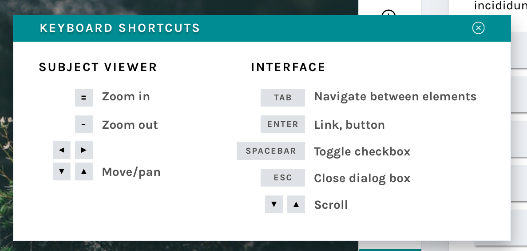
Keyboard shortcut modal
New modals
Many respondents to my 2017 design survey requested that they be able to use the keyboard to make classifications rather than having to click so many buttons. One volunteer actually called the classifier “a carpal-tunnel torturing device”. As a designer, that’s hard to hear – it’s never the goal to actively injure our volunteers.
We actually do support keyboard shortcuts! This survey helped us realize that we need to be better at sharing some of the tools our developers have built. The image above shows a newly designed Keyboard Shortcut information modal. This modal (or “popup”) is a great example of a few of the modals we’re building – you can leave it open and drag it around the interface while you work, so you’ll be able to quickly refer to it whenever you need.
This behavior will be mirrored in a few of the modals that are currently available to you:
Add to Favorites
Add to Collection / Create a New Collection
Subject Metadata
“Need Help?”
It will also be applied to a few new ones, including…
Field Guide
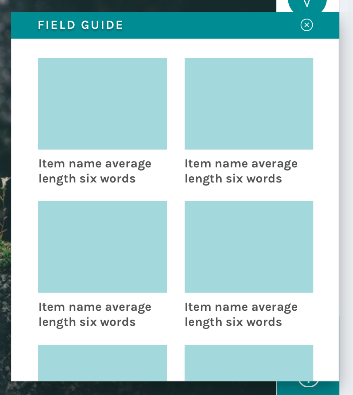
New field guide layout
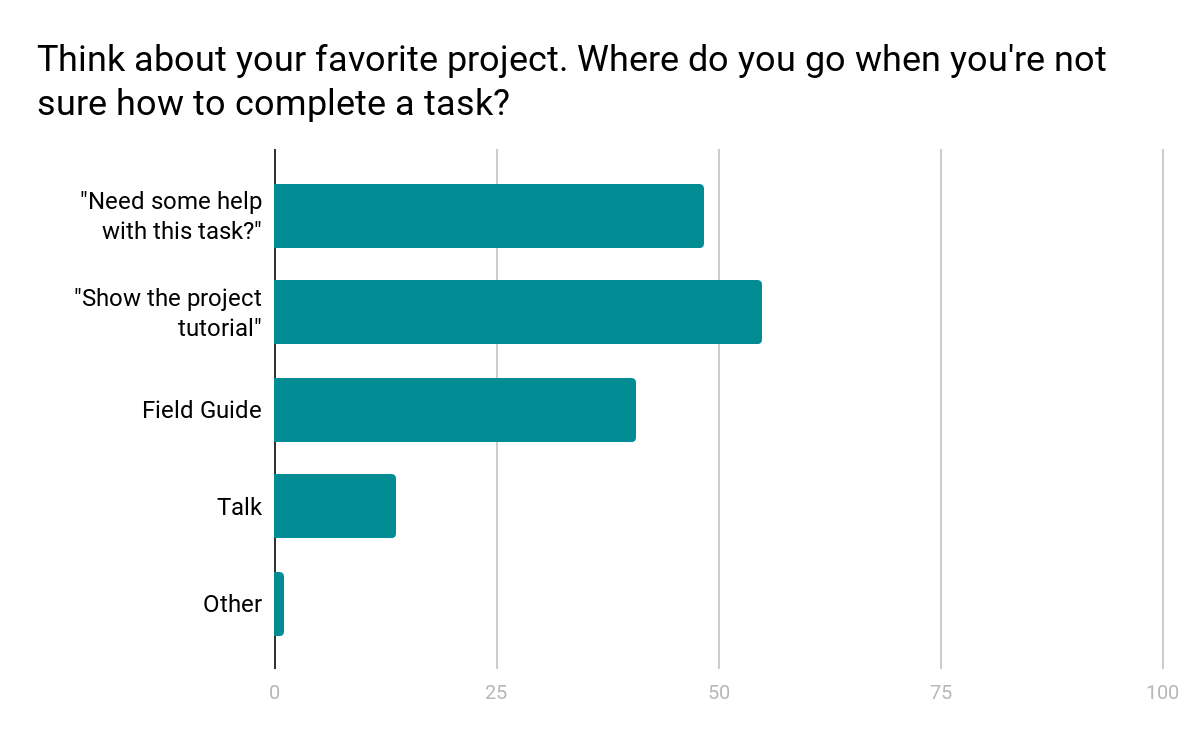
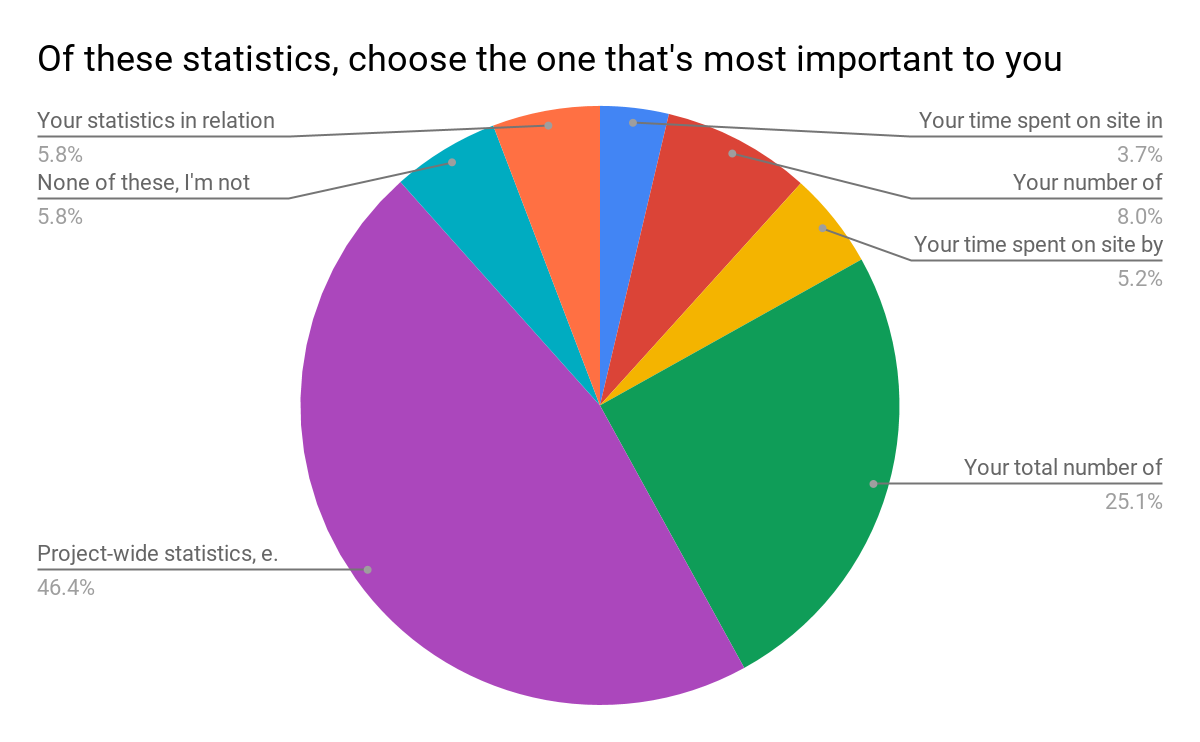
Another major finding from the design survey was that users did not have a clear idea where to go when they needed help with a task (see chart below).
Survey results show a mix of responses
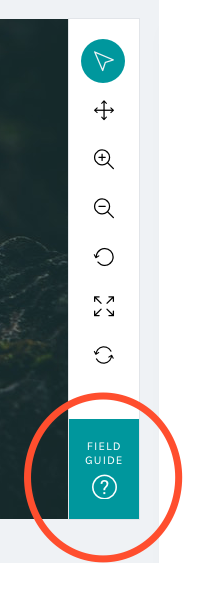
We know research teams often put a lot of effort into their help texts, and we wanted to be sure that work was reaching the largest possible audience. Hence, we moved the Field Guide from a small button on the right-hand side of the screen – a place that can become obscured by the browser’s scrollbar – and created a larger, more prominent button in the updated toolbar:
By placing the Field Guide button in a more prominent position and allowing the modal to stay open during classifications, we hope this tool will be taken advantage of more than it currently is.
The layout was the result of the audit of every live project I conducted in spring 2017:
Field Guide
Mode item count
5
Mode label word count
2
Min item count
2
Min label word count
2
Max items count
45
Max label word count
765
Using the mode gave me the basis on which to design; however, there’s quite a disparity between min and max amounts. Because of this disparity, we’ll be giving project owners with currently active projects a lot of warning before switching to the new layout, and they’ll have the option to continue to use the current Field Guide design if they’d prefer.
Tutorial
Another major resource Zooniverse offers its research teams and volunteers is the Tutorial. Often used to explain project goals, welcome new volunteers to the project, and point out what to look for in an image, the current tutorial is often a challenge because its absolute positioning on top of the subject image.
No more!
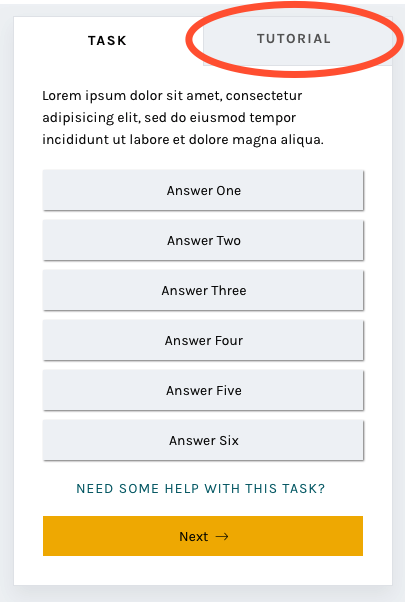
In this iteration of the classify interface, the tutorial opens once as a modal, just as it does now, and then lives in a tab in the task area where it’s much more easily accessible. You’ll be able to switch to the Tutorial tab in order to compare the example images and information with the subject image you’re looking at, rather than opening and closing the tutorial box many times.
A brand-new statistics section
Another major comment from the survey was that volunteers wanted more ways to interact with the Zooniverse. Thus, you’ll be able to scroll down to find a brand-new section! Features we’re adding will include:
Your previous classifications with Add to Favorites or Add to Collection buttons
Interesting stats, like the amount of classifications you’ve done and the amount of classifications your community have done
Links to similar projects you might be interested in
Links to the project’s blog and social media to help you feel more connected to the research team
Links to the project’s Talk boards, for a similar purpose
Possibly: A way to indicate that you’re finished for the day, giving you the option to share your experience on social media or find another project you’re interested in.
The statistics we chose were directly related to the responses from the survey:
Survey results
Respondents were able to choose more than one response; when asked to rank them in order of importance, project-wide statistics were chosen hands-down:
Project-wide statistics are the most important
We also heard that volunteers sometimes felt disconnected from research teams and the project’s accomplishments:
“In general there is too less information about the achievement of completed projects. Even simple facts could cause a bit of a success-feeling… how many pictures in this project over all have been classified? How much time did it take? How many hours were invested by all participating citizens? Were there any surprising things for the scientists? Things like that could be reported long before the task of a project is completely fullfilled.”
Research teams often spend hours engaged in dialog with volunteers on Talk, but not everyone who volunteers on Zooniverse is aware or active on Talk. Adding a module on the classify page showing recent Talk posts will bring more awareness to this amazing resource and hopefully encourage more engagement from volunteers.
Templates for different image sizes and dimensions
When the project builder was created, we couldn’t have predicted the variety of disparate topics that would become Zooniverse projects. Originally, the subject viewer was designed for one common image size, roughly 2×3, and other sizes have since been shoehorned in to fit as well as they can.
Now, we’d like to make it easier for subjects with extreme dimensions, multimedia subjects, and multi-image subjects to fit better within the project builder. By specifically designing templates and allowing project owners to choose the one that best fits their subjects, volunteers and project owners alike will have a better experience.
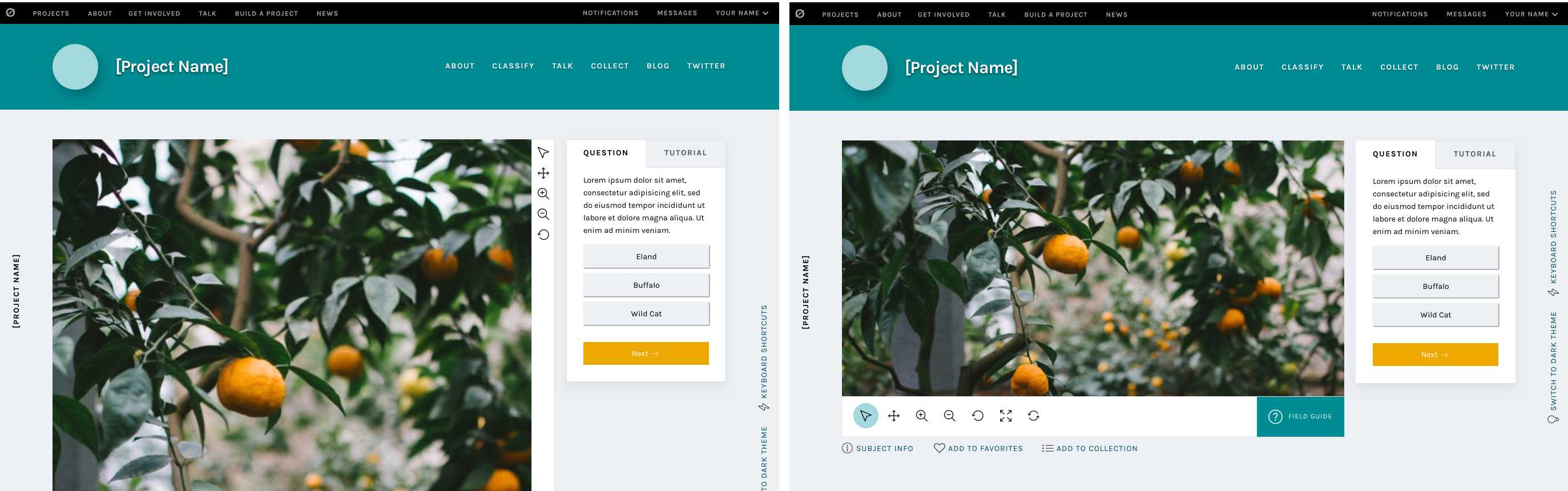
Very wide subjects will see their toolbar moved to the bottom of the image rather than on the right, to give the image as much horizontal space as possible. Tall subjects will be about the same width as they have been, but the task/tutorial box will stay fixed on the screen as the image scrolls, eliminating the need to scroll up and down as often when looking at the bottom of the subject.
Wide and tall subjects
Let’s get started!
I’m so excited for the opportunity to share a preview of these changes with you. Zooniverse is a collaborative project, so if there’s anything you’d like us to address as we implement this update, please use this survey to share your thoughts and suggestions. Since we’re rolling these out in pieces, it will be much easier for us to be able to iterate, test, and make changes.
We estimate that the updates will be mostly in place by early 2019, so there’s plenty of time to make sure we’re creating the best possible experience for everyone.
Thank you so much for your patience and understanding as we move forward. In the future, we’ll be as open and transparent as possible about this process.
The world's largest and most popular platform for people-powered research. This research is made possible by volunteers—millions of people around the world who come together to assist professional researchers.
 nt from Oxford University but I don’t spend all of my time studying physics, I also like to knit and go to science fiction conventions (especially Star Trek ones).