Category Archives: Technical

Introducing: the Community Catalog

The Community Catalog (https://community-catalog.zooniverse.org) is a custom tool to offer Zooniverse project participants the opportunity to explore a project dataset, and to allow our team to experiment with creating new pathways into classifying.

We wanted to create a digital space that would facilitate not only sharing, but also discovery of participants’ contributions alongside institutional information (i.e. metadata) about the subjects being classified. The result was a data exploration app connected to specific Zooniverse crowdsourcing projects (How Did We Get Here? and Stereovision) that allows users to search and explore each project’s photo dataset based on participant-generated hashtags as well as the institutional metadata provided by project teams. 

The Home Page of the Stereovision project in the Community Catalog.

The app includes a home page (shown above) with search/browsing capabilities, as well as an individual page for each photograph included in the project. The subject page (shown below) displays any available institutional metadata, participant-generated hashtags, and Talk comments. A ‘Classify this subject’ button allows users exploring the data to go directly to the Zooniverse project and participate in whatever type of data collection is taking place (transcription, labeling, generating descriptive text, etc.).

The Subject Page of the Community Catalog, displaying a subject with multiple Talk comments and community-generated hashtags.

Combined with the Talk (and QuickTalk) features, we’re hoping that this tool will encourage participants to share their experiences, memories, questions, and thoughts about the project photos, the historical events depicted, and the importance of the collection. The Community Catalog offers an approach where a participant can allow their interest in a specific item to lead them to take part in a classification task, rather than classification to Talk being a one-way street.

How Did We Get Here? was the pilot project for the Community Catalog, and is now complete. We have just launched the second project to use the Catalog, Stereovision, which you can participate in either via the Community Catalog site, or by visiting the Zooniverse project here: Stereovision.

The Community Catalog is not available for re-use by other projects in this exact form (i.e. as a standalone app), but we’re planning to incorporate some of its features into the Talk section of the Zooniverse platform in 2025. If you have any questions or would like to share your thoughts about this app, please feel free to reply to this post, or email us at contact@zooniverse.org.

The Community Catalog was developed as part of the AHRC-funded project Communities and Crowds. This project is run in collaboration with volunteer researchers and staff at the National Science and Media Museum in Bradford, United Kingdom, and National Museums Scotland, as well as with the Zooniverse teams at Oxford University and the Adler Planetarium in Chicago.

Navigating the Future: Zooniverse’s Frontend Codebase Migration and Design Evolution

Dear Zooniverse Community,

We’re pleased to update you on an important development as we undergo a migration to a new frontend codebase over the course of 2024-2025. This transition brings a fresh and improved experience to our platform.

From a participant’s perspective, the primary changes involve project layout and styling, resulting in a more user-friendly interface. Importantly, these updates don’t impact your stats (e.g,. classification count), Collections, Favorites, etc.

To offer you a sneak peek, check out the updated design and layout on projects that have already migrated, such as:

If a project has a design similar to the examples above, it has migrated. Conversely, if it resembles the old design, like the Milky Way Project, it hasn’t migrated yet.

We value your feedback! If you encounter any difficulties or have suggestions as you’re participating in a project, please share them in the respective project’s Talk or within this general Announcements Talk thread and mention @support.

Wondering about the motivation behind this change? We built the new frontend codebase in order to ensure the robustness and stability of the Zooniverse platform, with key updates enhancing code maintenance, accessibility, and overall sustainability.

Here’s a breakdown of some of the improvements:

  • Breaking up the Code: We’ve modularized our code into independent, reusable libraries to enhance maintenance and overall sustainability.
  • Next.js for Server Side Rendering: By utilizing Next.js, we’re improving accessibility for participants worldwide, particularly those with lower internet speeds and bandwidth.
  • Classify Page Code Updates: We’ve refined elements such as workflows and the subject viewer to ensure improved robustness and sustainability of our codebase.
  • Authentication Library Updates: Keeping up with the latest standards, we’ve updated our authentication libraries to enhance security and user experience.
  • Integrated Code Testing: To maintain the long-term health of our technical products, we’ve integrated code testing throughout our development process. This mitigates against updates introducing bugs or other issues into the codebase, adhering to standard practices.

Thank you for being part of the Zooniverse community! Looking forward to many more groundbreaking discoveries and advances in research. Your classifications and participation in Talk make all of this possible. Thank you! 

Warm regards,

Laura Trouille, Zooniverse PI

Fixed Cross-Site Scripting vulnerability on hosted media domains

We recently fixed a security vulnerability whereby an attacker could upload executable content to our media storage domains.

On 13th November 2022, a security researcher notified us of a cross-site scripting (XSS) vulnerability affecting our media storage domains. This XSS vulnerability made it possible for attackers to upload content to our storage domains that could then be shared as links for use in ‘phishing’ or other attacks.

We fixed the vulnerability on the morning of the 15th November 2022 by blocking script access to the API from the impacted domains ensuring any malicious code failed to gain access to authenticated private data. This remedial action was followed by a another fix on the 16th November that deployed block rules on our Content Distribution Network (CDN) provider to prevent malicious resource links being served to users. In addition, on the 8th of December we deployed a change to the API to only allow non-malicious files to be uploaded to these storage domains.

The mitigation and fix steps described above allowed us time to research the problem and audit our storage systems for any live exploits. After this audit we determined that this vulnerability had not been exploited for any malicious purpose; no data was leaked and no users were exposed to injected code.

We’d like to thank Michal Biesiada (https://github.com/mbiesiad) for bringing this issue to our attention and for following responsible disclosure by reporting it to us in private, as requested on our security page.

Fixed Cross-Site Scripting Vulnerability on Zoomapper App

On 9 November 2020, a security researcher notified us of a cross-site scripting (XSS) vulnerability on our zoomapper application. This service hosts tile sets that are used to render maps for a small number of other Zooniverse applications, but is not connected to any critical Zooniverse infrastructure. This XSS vulnerability could have allowed users to execute malicious code on the zoomapper application in the browser.

We were able to remediate the vulnerability within hours of the report by disabling the browser GUI for zoomapper (see PR #6). The GUI had been turned on by default for the zoomapper app, but is not necessary to fulfill the app’s intended role.

Additional notes on the incident:

  • The vulnerability existed since the app was first deployed on September 15th 2020.
  • The vulnerability was located in the underlying Tileserver-GL dependency.
  • No Zooniverse user or project data was vulnerable or exposed by this vulnerability.

We’d like to thank Rachit Verma (@b43kd00r) for bringing this issue to our attention and for following responsible disclosure by reporting it to us in private, as requested on our security page.

Zooniverse Mobile App Release v2.8.2!

Now it’s even easier to contribute to science from your phone!

On any crowded public bus (before the pandemic), people sat next to each other, eyes fixed on their phones, smiling, swiping. 

What were they all doing? Using a dating app, maybe. Or maybe they were separating wildcam footage of empty desert from beautiful birds. Maybe they were spotting spiral arms on faraway galaxies.

Maybe one of them was you!  

We’ve loved seeing the participation in the Zooniverse through the mobile app (available for iOS and Android) over the past two years. So we made it even easier for you to do that wherever you swipe these days—a park bench, or maybe your home. (Please don’t swipe and drive). 

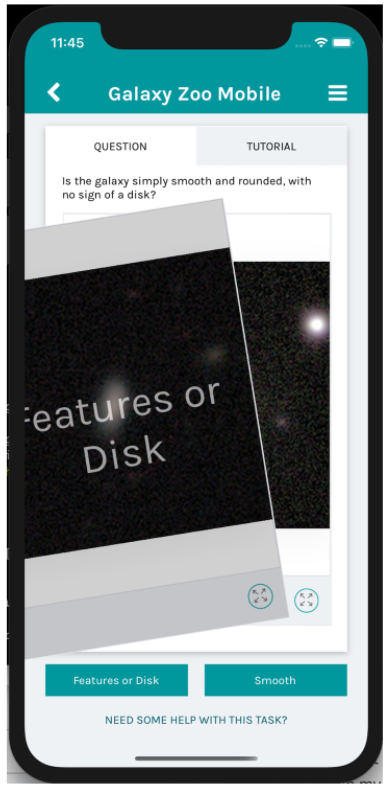
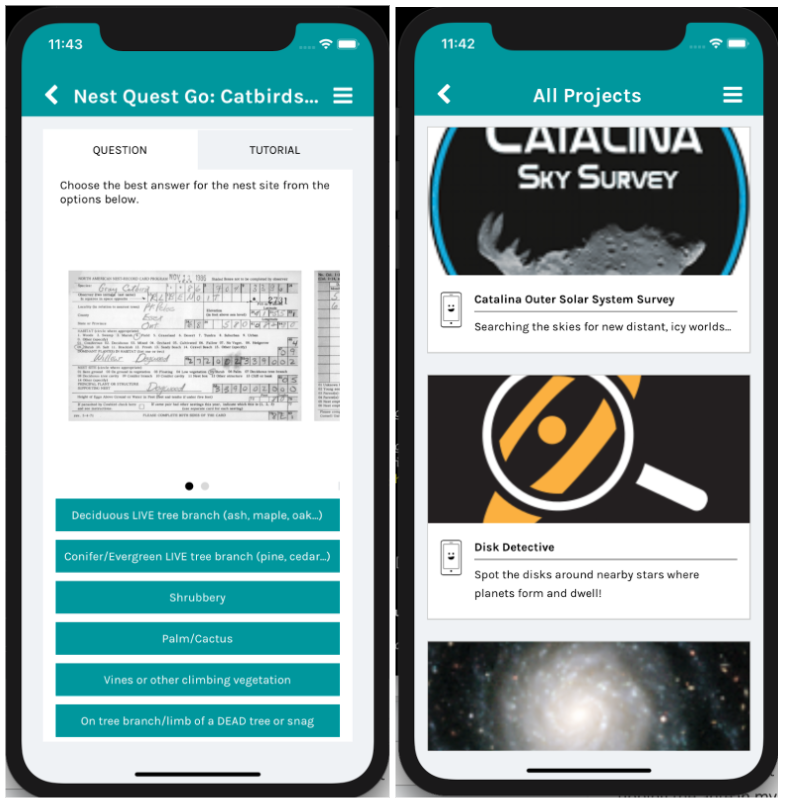
Right now, you can go into the app and contribute to Galaxy Zoo Mobile, Catalina Outer Solar System Survey, Disk Detective, Mapping Historic Skies, Nest Quest Go, or Planet Four: Ridges. And we have more projects on the way!

What’s new in the app

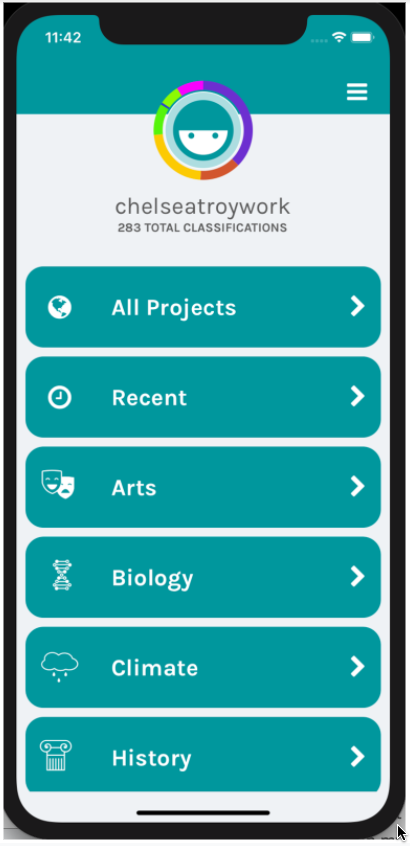
When you update to version 2.8.2, you’ll notice a slick new look. At the very top, there’s now an “All Projects” category. This will show you everything available for mobile—with the projects that need your help the most sorted at the very top! You can also still choose a specific discipline, of course.

That’s it for features that are totally new, but a lot of features in this version are fixed. No more crashing when you tap on browser projects. A lot fewer project-related crashes. Animated gifs, which previously worked only on iOS, now also work on Android—so researchers can show you an image that changes over time.  

What’s more—and you’ll never see this, but it’s important to us, the developers—we’ve made a lot of changes that help us keep improving the app. We have better crash reporting mechanisms and more complete automated testing. We also updated all of our documentation so that developers from outside our team can contribute to the app, too! We’d love to be a go-to open source project for people who are learning, or working in, React Native (the platform on which our app is built).

Aggregate Functionality

The full list of functionalities now includes:

  • Swipe (binary question [A or B.] response)
  • Single-answer question (A, B, or C)
  • Multi-answer question (any combination of A, B, and C.)
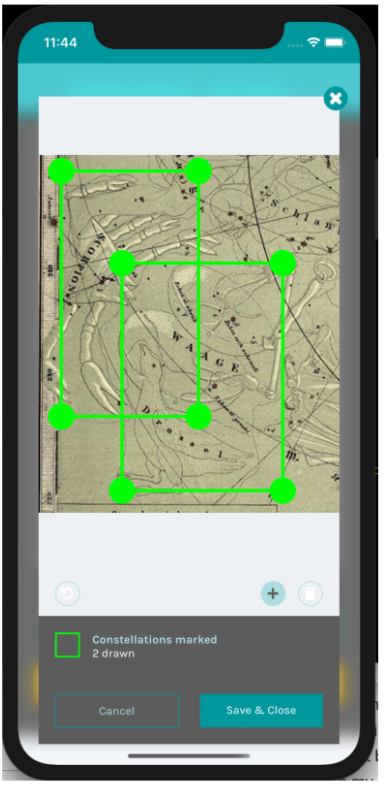
  • Rectangle drawing task (drawing a rectangle around a feature within a subject)
  • Single-image subjects
  • Multi-image subjects (e.g. uploading 2+ images as a single subject; users swipe up/down to display the different images)
  • Animated gifs as subjects
  • Subject auto-linking (automatically linking subjects retired from one workflow into another workflow of interest on the same project)
  • Push notifications (sending messages/alerts about new data, new workflows, etc., via the app)
  • Preview (an owner or collaborator on a project in development being able to preview a workflow in the ‘Preview’ section of the mobile app)
  • Beta Review (mobile enabled workflows are accessible through the ‘Beta Review’ section of the app for a project in the Beta Review process; includes an in-app feedback form)
  • Ability to see a list of all available projects, as well as filter by discipline (with active mobile app workflows listed at the top)

We also carried out a number of infrastructure improvements, including: 

  • Upgrades to the React Native libraries we use
  • Created a staging environment to test changes before they are implemented in full production
  • Additional test coverage
  • Implemented bug reporting and tracking
  • Complete documentation, so open source contributors can get the app running from our public code repository
  • And a myriad of additional improvements like missing icons no longer crashing the app, improvements to the rectangle drawing task, etc.

Note: we will continue developing the app; this is just the end of this phase of effort and a great time to share the results.

If you’re leading a Zooniverse project and have any questions about where in the Project Editor ‘workflow’ interface to ‘enable on mobile’, don’t hesitate to email contact@zooniverse.org. And/or if you’re a volunteer and wonder if workflow(s) on a given project could be enabled on mobile, please post in that project’s Talk to start the conversation with the research team and us. The more, the merrier!

Looking forward to having more projects on the mobile app!

A Few Stats of Interest:

  • Since Jan 1, 2020: 
    • 6.2 million classifications submitted via the app (that’s 7% of 86.7 million classifications total through Zooniverse projects)
    • 18,000 installations on iOS + 17,000 on Android
  • Current Active Users (people who have used the app in the last 30 days):
    • 1,800 on iOS + 7,700 on Android

Previous Blog Posts about the Zooniverse Mobile App:

Caesar Subject Rule Effect Vulnerability Report

In the beginning of April 2020, we were notified that subjects from one Zooniverse project were appearing in the subject set of a separate project where they did not belong. In our investigation of the issue, our team determined that this behavior was being caused by a Caesar configuration mistake that used an incorrect Subject Set ID. Project owners using Caesar were able to create Subject Rule Effects that added subjects to collections or subject sets, even without proper subject set editing permissions. We have rectified the issue surrounding Subject Rule Effects and eliminated this vulnerability, and would like to share the details for anyone who is interested.

The issue was raised by project lead James Perry (@JamesPerry), who reported that subjects that didn’t belong to his project were appearing in his subject sets.  Due to a mistyped subject set ID in a Caesar `add_to_subject_set` effect for an unrelated project, that Subject Rule Effect was sending subjects from that project to one of James’s subject sets instead of the correct target.

Our immediate course of action was to fix the project impacted by the vulnerability, and push out a temporary code fix to prevent the vulnerability from being exploited. 

  1. To fix the affected project, we updated the incorrect subject set id for the project that was incorrectly sending subjects to the wrong project and removed the unwanted subjects from the set. 
  2. On April 3rd we deployed a temporary code fix to disable Subject Rule Effect creation and modification for all but admin users (see PR #1109). This change was communicated to affected teams that were most impacted by the change, and teams that reached out after seeing our notification banner or encountering a Caesar interface error.

On May 15th we pushed out a permanent fix that checked the user has permissions to send data to the target subject set or collection. Specifically, the updated validation code checks that the user has update permissions on the project the subject set or collection is linked to. (see PRs #1115, #1129 and #1131). 

For anyone running their own hosted copy of Caesar, we recommend pulling these changes as soon as you’re able.

Cross-Post — Lessons from Space: Why Delay a Launch?

Today’s cross-post is from ChelseaTroy.com, blog site of one of our Zooniverse developers. Chelsea writes codes for open source projects like our Zooniverse Citizen Science Mobile App and NASA Landsat Image Processing Pipeline. She also teaches Mobile Software Development at the Master’s Program in Computer Science at the University of Chicago.

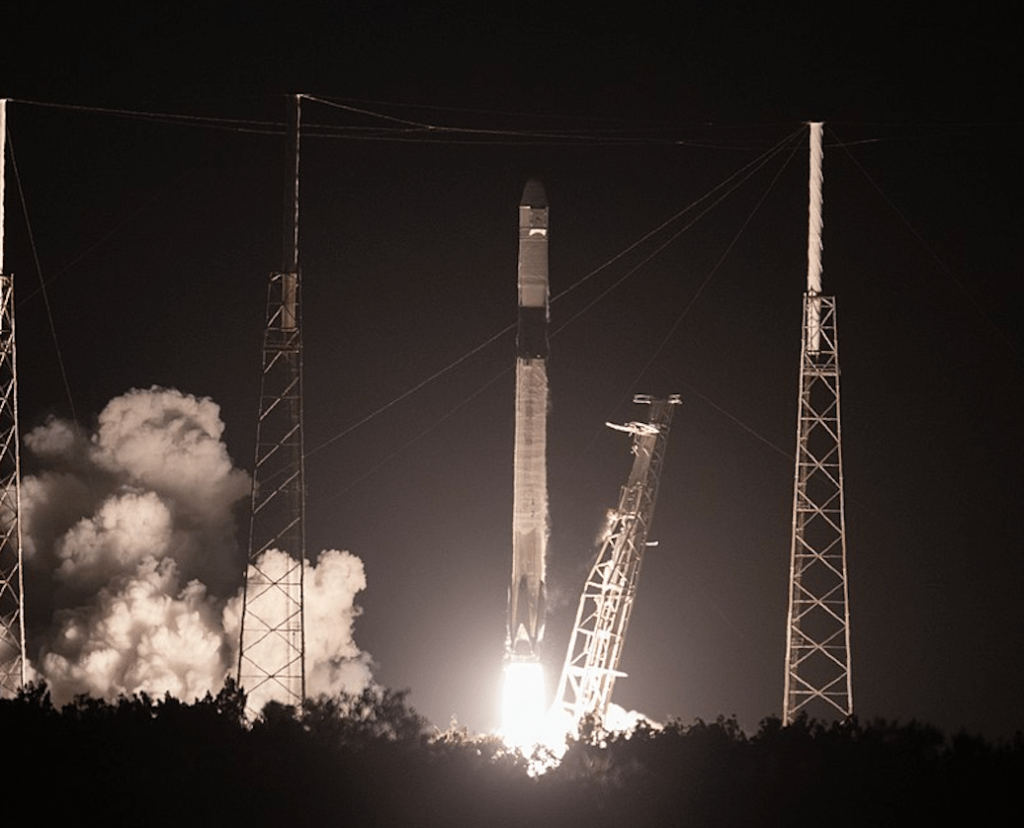
A SpaceX Falcon 9 rocket lifts off from Space Launch Complex 40 at Cape Canaveral Air Force Station in Florida at 11:50 p.m. EST on March 6, 2020, carrying the uncrewed cargo Dragon spacecraft on its journey to the International Space Station for NASA and SpaceX’s 20th Commercial Resupply Services (CRS-20) mission. Dragon will deliver more than 5,600 pounds of science investigations and cargo to the orbiting laboratory. Credit: NASA and https://en.wikipedia.org/wiki/File:CRS-20_launch.jpg

Chelsea was selected as a NASA Social appointee to attend the launch of last week’s CRS-20 cargo resupply mission to the International Space Station (this included attending the launch of the SpaceX Falcon 9 rocket and Dragon spacecraft, meeting w/ NASA’s social media team, touring NASA facilities at Kennedy, meeting with experts, and more). Check out all her posts on instagram, twitter, and chelseatroy.com.

This post of Chelsea’s, on why the launch was delayed, resonated in particular with us as a web development team. Across many fields, the lessons and insights around the role of deadlines, the value of redundancy, learning from past experiences/mistakes to make better predictions and mitigate risk, etc. apply.

Check out the full post at https://chelseatroy.com/2020/02/27/lessons-from-space-why-delay-a-launch/. Enjoy!

Panoptes CLI 1.1 now available

I recently released version 1.1 of the Panoptes CLI – the command-line interface for managing Zooniverse projects. This update includes some exciting new features. Here are the highlights.

You can install the update by running pip install -U panoptescli. Any bugs or issues should be raised via GitHub. See the changelog for the full list of changes.

Resuming failed subject uploads

This one adds what is probably the CLI’s most requested feature: the ability to resume a failed upload from where it left off, without duplicating subjects or requiring manual changes to the manifest. I hope this will be a huge help to researchers, especially when uploading large manifests.

If the upload fails for any reason – whether that’s an issue with our systems, a problem with your internet connection, a bug in the CLI itself, or if you just decide to stop the upload by pressing ctl-c – the CLI will detect that there was a problem and will ask you if you want to be able to resume the upload later. If you say yes, it will then save a new manifest in YAML format containing the remaining upload queue along with all of the upload’s command line options. Then to resume, you just start a new upload with the YAML manifest instead of the original CSV.

Multithreaded subject uploads

Uploading new subjects can often take a long time. The total upload time depends not only on your internet connection speed, but also on the time it takes for the CLI to talk to the Panoptes API. Creating a new subject typically requires the CLI to make two HTTP requests: one to create the subject and one to upload the subject’s media (the image, or video, or whatever). If the subject has multiple images then that only increases the number of requests. Plus subjects need to be linked to the subject set; this happens in batches, but it can still add up to a lot of requests for large uploads. If you’re uploading 10,000 subjects for example, that means the CLI has to make a minimum of 20,000 requests (probably more), and each of those requests includes some overhead where the CLI is waiting for the server to respond, which is all basically wasted time.

Luckily the Panoptes CLI 1.1 gets around that, by taking advantage of the multithreading features of the Panoptes Client for Python which were released earlier this year. Now, those 20,000 requests will happen five at a time, so for example three of them can be sending data while two of them are waiting for the server, meaning your internet connection is fully utilised the whole time and no time is wasted. In my testing, this substantially sped up subject uploads, potentially saving hours of your time.

Adding and removing lists of subjects to and from subject sets

Often project owners need to add large numbers of existing subjects to a new set, or remove subjects from their current set. It was possible to do this with the previous version of the CLI by passing subject IDs on the command-line, but it was often difficult to modify large numbers of subjects this way (it was possible with xargs on Linux and macOS, but this isn’t the most intuitive way to do it).

Now, there’s a new option to pass a list of IDs in a text file rather than having to specify IDs on the command-line. (The old way is still there too if you prefer to do it that way!) Just produce a text file containing the relevant subject IDs, one per line. If you already have the subject information in a spreadsheet, exporting a CSV file with just the subject ID column will produce the right file (just make sure it only contains the one column).

For example, if you have a file called subject_ids.csv containing the following:

1234
5678
9012

You can run:

panoptes subject-set add-subjects -f subject_ids.csv 1357

to add subjects 1234, 5678, and 9012 to subject set 1357.


Edited 29 November 2019: Fixed typo in pip command for upgrade.

Live Coding the Zooniverse

Here at the Zooniverse, we make scientific discovery accessible to the community. Now, we’re incorporating that philosophy into our software engineering.

Our mobile developer, Chelsea Troy, live streams some of her development work on the Zooniverse Mobile App (available on the Apple App Store for iOS and Google Play for Android). This means that you can watch her as she codes, and you can even submit questions and suggestions while she is working!  For an introduction to the App and Chelsea’s code development efforts, check out this YouTube video.

Why did we decide to try out live coding? Chelsea talks a little bit about that decision in this blog post. Among the reasons: live coding videos are a great way to attract and recruit possible open source contributors whose work on the Zooniverse mobile app and other codebases could greatly benefit the Zooniverse.

After each live stream, a recording of the session will remain on YouTube. Chelsea also publishes show notes for each stream that include a link to the video, a link to the pull request created in the video, an outline of what we covered in the video (with timestamps), and a list of the parts of the video that viewers found the most useful.

Sound interesting? Willing to contribute to Zooniverse open source code development? Keep an eye on Chelsea’s Twitter account (@heychelseatroy) and blog for future live stream events.  But go ahead and check out the recording of her first live stream and show notes to get you started.

For more information on the mobile app, see related blog posts:
Blog Entry: Notes on the Zooniverse Mobile App – New Functionality Release
Blog Entry: A First Look at Mobile Usage and Results

Featured Image Credit: Reddit/cavepopcorn

The Zooniverse is Now Powered by Kubernetes

We recently finished the first stage in a pretty big change to our web hosting infrastructure. We’ve moved all of our smaller backend services (everything except Panoptes, Ouroboros, and frontend code) into a Kubernetes cluster. I’m pretty excited about this change, so I wanted to share what we’ve done and what we’ll be doing next.

Kubernetes is what’s called a container orchestration system, which is a system that lets us run applications on a cluster of servers without having to worry about which specific server each thing is running on. There are a few different products out there that do this sort of thing, and prior to this we were using Docker Swarm. We didn’t find Docker Swarm to be a great fit for us, but we’re really pleased with Kubernetes and what it’s letting us do.

As a result of moving to Kubernetes, we’ve been able to fully automate the process of updating our server-side apps when we make changes to the code. This automation is important, because it means that the process of deploying updated code is no longer a bottleneck in our development process – it means that any member of our team can easily deploy changes, even in components they haven’t worked on before. This smooths out our development process and it should make our jobs a little easier, meaning we can more easily focus on the job of building the Zooniverse without our infrastructure getting in the way.

Not only has Kubernetes made it easier for us to automate things, but we’ve also found it to be a lot more reliable. So much so, in fact, that we’re now planning to move all of our web services into a Kubernetes cluster, including Panoptes and our main HTTP frontend servers. This is the part I’m really excited about! By making this change, we’ll be making our infrastructure a lot simpler to manage while also saving money by using our cloud computing resources more efficiently (since the cluster’s resources are pooled for everything to share). That should obviously be a huge win, because it will leave more time and money for everything else we do.

Watch this space for updates as we make more improvements to our infrastructure over the coming months!